Overview
1. LipiCore-Engine
LipiCore-Engine is a high-performance, white-label search solution designed specifically for developers and product teams. Built on Apache Solr, it provides enterprise-grade search capabilities that can be seamlessly integrated into your applications with minimal configuration.
| LipiCore-Engine delivers blazing fast search results even with millions of records. |
LipiCore-Engine is a complete search infrastructure that handles everything from data ingestion to complex search queries. It’s designed to scale with your business while maintaining consistent performance.
1.1. Key Features
| Feature | Description |
|---|---|
Enterprise-Grade Performance |
Built on Apache Solr with optimizations for speed and scalability. Handles millions of records with sub-second response times. |
Advanced Search Capabilities |
Full-text search, faceted navigation, filtering, auto-suggestions, spell correction and complex query support. |
Data Synchronization |
Push data updates via REST APIs or schedule batch imports from databases. |
Multi-Language Support |
Optimized for global applications with support for multiple languages. |
Role-Based Security |
Granular API access control with separate tokens for Admin, Configuration, Data Management and Search operations. |
Complete White-Label Solution |
Zero LipiCore-Engine branding. Fully customizable to match your brand identity and user experience. |
Developer-First Design |
RESTful JSON APIs with comprehensive documentation, code examples and interactive testing capabilities. |
1.2. Use Cases
LipiCore-Engine excels in scenarios requiring fast, accurate search across large datasets.
| Use Case | Description |
|---|---|
E-commerce Platforms |
Product search with filters, faceted navigation, price ranges and inventory management. |
Business Intelligence Dashboards |
Analytics, reporting and data exploration with aggregations and drill-down capabilities. |
Data Analytics Platforms |
Large-scale data exploration, filtering and visualization with statistical aggregations. |
1.3. Why LipiCore?
-
Performance: Blazing fast search across millions of records
-
Scalability: Handles growing data volumes without performance degradation
-
Flexibility: Customizable to match your exact requirements
-
Reliability: Enterprise-grade stability with 99.9% uptime
-
Support: Comprehensive documentation and developer support
2. Quick Link
2.1. Interactive Demo
Experience LipiCore-Engine capabilities with our interactive demo featuring real-world datasets and search scenarios.
| Try the LipiCore-Engine Interactive Demo to see features in action. |
-
E-commerce Search: Product catalog with filters, facets and autocomplete
-
Content Search: Document search with highlighting and suggestions
-
Analytics Dashboard: Real-time aggregations and drill-down capabilities
2.2. Admin Panel
The LipiCore-Engine Admin Panel provides a web-based interface for testing and managing different collections.
| Access the LipiCore-Engine Admin Panel for collection management. |
-
Navigate to the Admin Panel URL
-
Select your collection from the dropdown
-
Use the query as is or adjust to test search functionality
3. Getting Started
This section will help you get up and running with LipiCore-Engine APIs quickly.
3.1. Prerequisites
Before you begin, ensure you have:
-
A valid LipiCore license and configuration
-
API access credentials (tokens)
-
Basic understanding of REST APIs and JSON
-
Your data source ready for indexing
3.2. Authentication
LipiCore-Engine uses token-based authentication. All API requests require a valid token in the header.
Authorization: Bearer {Token}3.2.1. Base URL
All API endpoints are relative to your LipiCore-Engine instance.
https://lipicore.your-domain.com/api| Feel free to explore LipiCore-Engine through various APIs (Search, Data & Admin). |
APIs (Search)
LipiCore-Engine provides a comprehensive set of search APIs designed to handle various search scenarios. Each API is optimized for specific use cases while maintaining consistent performance and response formats.
LipiCore-Engine offers 5 specialized search APIs, each designed for specific functionality:
| API Type | Description & Use Cases |
|---|---|
The primary search API for full-text search, filtering and faceted navigation. Supports complex queries, sorting, highlighting and pagination. Ideal for product catalogs, content search and data exploration. |
|
Specialized API for searching within predefined groups or categories. Enables quick categorization and group-based filtering. Perfect for hierarchical data structures and category-based navigation. |
|
Real-time text completion and suggestion API. Provides intelligent suggestions as users type, improving search experience and discoverability. Essential for search-as-you-type interfaces. |
|
Intelligent spelling correction based on your indexed data. Automatically suggests corrections for misspelled search terms, improving search accuracy and user experience. |
|
API that combines multiple search operations into a single request. Executes searches in parallel for optimal performance. Reduces network overhead and improves response times. |
All search APIs share these common capabilities:
-
Authentication: Token-based security
-
Pagination: Configurable result limits and offsets
-
Error Handling: Consistent error response format
-
Performance: Sub-second response times
-
Scalability: Handles millions of records efficiently
-
Use the appropriate API for your use case
-
Implement proper error handling
-
Use pagination for large result sets
-
Combine multiple operations when possible
4. Query
| Param | Default | Example | Description |
|---|---|---|---|
ref |
N/A |
"q1" |
Reference id/key/string of request going back in response as is. It has nothing to do with the search. It helps multiple requests from caller to track each of them correctly. |
text |
N/A |
"Bud" |
Standard text search which applies to various fields by default |
searchFields |
N/A |
"name^2 company short_desc^0.5" |
Each field’s importance can be boosted differently for the text search. Given example boosts matches in name with double multiplier, keeps company at default weight and lowers the importance of short_desc by half. |
quickSearch |
false |
true |
Standard text search which applies to selected fields to support a faster result |
query |
N/A |
"name:Vineyards" |
The query search feature enables field-level searches through direct Solr queries |
sort |
N/A |
"gluten_free desc,name asc" |
The sort enables manual sorting on response docs |
fuzzy |
0 |
1 |
Fuzzy search allows values 0 (default), 1 or 2. Adds number of character fuzziness during search. Applies to "text" and "search" both having string values. (Example: Search of "roam" with fuzzy=1, will match terms like roams & foam. It will also match the word "roam" itself.) |
filters |
N/A |
{"category_s":"Beer","sugar_free": true} |
Filters the results with additional query by specific fields |
join |
N/A |
{"collection": "gls-price","from": "product_id","to": "product_id","query": "id:(3913_10229 9267_10229) AND inventory:true"} |
To join from another collection in Solr, specify the
|
facetLimit |
5 |
10 |
Number of top buckets required within each facet |
facets |
N/A |
["brand_s","type_s"] |
Facet fields to have positive counts of the values |
highlighting |
N/A |
["name","short_desc"] |
With highlights, now json renders more readable format with colors |
facetSorts |
N/A |
{ "region_s":"index asc", "item_type_s":"count asc" } |
Applies sorting on facets: defaults to |
statFacets |
N/A |
{"avgPrice": "avg(price)"} |
Used for statistical calculations on fields within your dataset. (Example: min(price) ,max(price) ,sum(price), avg(price), count(price), percentile(field, 90), stddev(field),median(price)) |
rangeFacets |
N/A |
{ "prices": { "field": "price", "start": "0", "end": "100", "gap": "10" } } |
Used for range facets on fields within your dataset. In JSON,
|
nestedFacets |
N/A |
{ "country_s": { "facetLimit": 5, "nestedFacetSort": "yFacet", "statFacets": { "yFacet": "sum(unit_price)" }, "nestedFacets": { "item_type_s": { "facetLimit": 5, "nestedFacetSort": "yFacet", "statFacets": { "yFacet": "sum(unit_price)" } } } } } |
Nested facets generated multi-dimension results with combinations of "facets" and "statFacets". Extremely useful for dashboards and visualisations. |
nestedFacetSort |
N/A |
|
Defines sorting behavior for nested facets. Defaults to descending count (count desc). Supports custom sorting: |
start |
0 |
11 |
Need record from |
rows |
10 |
20 |
Number of records (Pagination size) |
nested |
false |
true |
If nested is true, response includes child as part of parent. Child docs always remains parallel to parent as separate docs. |
return |
All Fields |
["id","sku","name","image","brand"] |
Returns all fields in response. If specified, returns only those specified fields. |
Multi-word effect can be applicable in "filters & text" by escaping double quote. {"brand_s": "\"Johny Walker\""}
|
| In "facets", use "_s" postfix for field having single text value (not "list" value). It gives non-tokenised proper as-is full multi-words value in filters. |
| + - && || ! ( ) { } [ ] ^ " ~ * ? : / characters are reserved and not supported directly in search: To include any of these characters in the search text, prefix them with a backslash (\) to escape them. |
4.1. Special Cases
4.1.1. Escape
If "starts with" queries have more than one word, they give unexpected results.
For example, "…:Bud Li*" gives results starting with "Li…" because Solr is a tokenized mechanism that treats "Bud" and "Li" as separate tokens.
Simply escape all spaces in "starts with" queries using backslashes to prevent tokenization. This tells Solr to treat the phrase as a single token.
| Query Type | Query | Result |
|---|---|---|
Starts with - Without escape |
|
Matches anything starting with "Li" (e.g., "Light", "Lite", "Lincoln") because Solr tokenizes "Bud Li" into separate tokens. |
Starts with - With escape |
|
Matches only results starting with "Bud Li" (e.g., "Bud Light", "Bud Lite") because the escaped space prevents tokenization. |
Multi-word in filters |
|
Matches exact multi-word phrase "Johny Walker" in filters. Escaped double quotes ensure the phrase is treated as a single token. |
Multi-word in text |
|
Matches exact multi-word phrase "Johny Walker" in text search. Escaped double quotes ensure the phrase is treated as a single token. |
4.1.2. Word Boosting
First word in search may not have higher search priority. For example, searching "Bud Lite" may return "Miller Lite" first instead of "Bud Light" because a four-character match ("Lite" matches in "Miller Lite") gives higher priority than a three-character match ("Bud" matches in "Bud Light").
Use the caret (^) notation to boost specific words in your search query. It gives higher priority to the boosted word/s. The number after caret (^) indicates the boost factor.
| Boost | Search Query | Description |
|---|---|---|
Natural scoring (no boost) |
|
Uses natural scoring without any word preference. Results are ranked based on character match relevance. |
Single word boost |
|
Gives preference to "Bud" with a boost factor of 2. It prioritizes results containing "Bud" over "Lite" alone. |
Multiple words boost |
|
Boosts "Light" with factor 3 and "Ice" with factor 2. Higher numbers indicate higher priority. Results matching "Light" will have highest priority, followed by "Ice", then "Bud". |
4.1.3. Fuzzy
Searching "henesy" with fuzzy=2 returns "honest" as the first result and "hennessy" as the second result, even though "hennessy" is phonetically closer to "henesy".
-
Fuzzy search works based on pure character count differences, not phonetics or visual similarity.
-
Fuzzy search works on pure character count differences (Levenshtein distance). It calculates how many characters need to be changed, added, or removed to match the search term.
-
Complex queries with AND, OR, parentheses, or multiple colons are not supported with fuzzy search
| Search Query | Result | Explanation |
|---|---|---|
|
"honest" (first), "hennessy" (second) |
"honest" has 2 character differences (e, h swapped, n added) without adding characters, which algorithm considers a better match than "hennessy" which has 2 character differences with 2 added characters. |
|
"roam", "foam", "roams" |
Matches terms within 1 character difference: "roam" (exact match), "foam" (changed 'r' to 'f'), "roams" (added 's'). |
|
"cat", "cut", "bat", "cats" |
Matches terms within 1 edit distance: "cat" (exact match), "cut" (changed 'a' to 'u'), "bat" (changed 'c' to 'b'), "cats" (added 's'). |
Phonetic mismatch |
|
Fuzzy does not consider phonetics. "phonic" and "fonic" are phonetically similar but have different character patterns, so fuzzy does not match them. |
4.2. Search Query
POST /api/v1/search/query/{collection}
|
4.2.1. Success
HTTP request
POST /api/v1/search/query/lipicore-test
Authorization: Bearer {Token}

{
  "ref" : "q1",
  "rangeFacets" : {
    "prices" : {
      "field" : "price",
      "gap" : 10,
      "start" : 0,
      "end" : 100
    }
  },
  "query" : "name:Lime",
  "start" : 0,
  "facetLimit" : 3,
  "text" : "Bud",
  "filters" : {
    "category_s" : "Beer"
  },
  "rows" : 2,
  "statFacets" : {
    "avgPrice" : "avg(price)"
  },
  "fuzzy" : 1,
  "return" : [ "id,sku,name,pack_size" ],
  "facets" : [ "sub_category_s", "brand_s", "type_s" ]
}
Response body
{
  "request" : {
    "facetLimit" : 3,
    "facets" : [ "sub_category_s", "brand_s", "type_s" ],
    "filters" : {
      "category_s" : "Beer"
    },
    "fuzzy" : 1,
    "nested" : false,
    "query" : "name:Lime",
    "quickSearch" : false,
    "rangeFacets" : {
      "prices" : {
        "end" : "100",
        "field" : "price",
        "gap" : "10",
        "start" : "0",
        "statFacets" : null
      }
    },
    "ref" : "q1",
    "return" : [ "id,sku,name,pack_size" ],
    "rows" : 2,
    "start" : 0,
    "statFacets" : {
      "avgPrice" : "avg(price)"
    },
    "text" : "Bud"
  },
  "resTime" : 61,
  "results" : {
    "response" : {
      "numFound" : 16,
      "start" : 0,
      "numFoundExact" : true,
      "docs" : [ {
        "id" : "57",
        "sku" : 1000000057,
        "pack_size" : 6,
        "name" : "Bud Light Lime-A-Rita Splash"
      }, {
        "id" : "51",
        "sku" : 1000000051,
        "pack_size" : 6,
        "name" : "Bud Light Lime Straw-Ber-Rita Splash"
      } ]
    },
    "facets" : {
      "count" : 16,
      "avgPrice" : 4.0625,
      "type_s" : {
        "buckets" : [ {
          "val" : "Coolers & Malt Beverages",
          "count" : 10
        }, {
          "val" : "Lager",
          "count" : 6
        } ]
      },
      "sub_category_s" : {
        "buckets" : [ {
          "val" : "Domestic Beer",
          "count" : 16
        } ]
      },
      "prices" : {
        "buckets" : [ {
          "val" : 0.0,
          "count" : 15
        }, {
          "val" : 10.0,
          "count" : 0
        }, {
          "val" : 20.0,
          "count" : 0
        }, {
          "val" : 30.0,
          "count" : 0
        }, {
          "val" : 40.0,
          "count" : 0
        }, {
          "val" : 50.0,
          "count" : 0
        }, {
          "val" : 60.0,
          "count" : 1
        }, {
          "val" : 70.0,
          "count" : 0
        }, {
          "val" : 80.0,
          "count" : 0
        }, {
          "val" : 90.0,
          "count" : 0
        } ]
      },
      "brand_s" : {
        "buckets" : [ {
          "val" : "Bud Light",
          "count" : 16
        } ]
      }
    }
  }
}
4.2.2. Quick Search
HTTP request
POST /api/v1/search/query/lipicore-test
Authorization: Bearer {Token}

{
  "ref" : "q1",
  "quickSearch" : "true",
  "text" : "Abita Andygator",
  "return" : [ "id,sku,name,pack_size" ]
}
Response body
{
  "request" : {
    "facetLimit" : 5,
    "fuzzy" : 0,
    "nested" : false,
    "quickSearch" : true,
    "ref" : "q1",
    "return" : [ "id,sku,name,pack_size" ],
    "rows" : 10,
    "start" : 0,
    "text" : "Abita Andygator"
  },
  "resTime" : 61,
  "results" : {
    "response" : {
      "numFound" : 1,
      "start" : 0,
      "numFoundExact" : true,
      "docs" : [ {
        "id" : "3",
        "sku" : 1000000003,
        "pack_size" : 6,
        "name" : "Abita Andygator"
      } ]
    }
  }
}
4.2.3. Highlighting
HTTP request
POST /api/v1/search/query/lipicore-test
Authorization: Bearer {Token}

{
  "ref" : "q1",
  "text" : "Bud",
  "highlighting" : [ "name", "short_desc" ],
  "return" : [ "id,sku,name,pack_size" ]
}
Response body
{
  "request" : {
    "facetLimit" : 5,
    "fuzzy" : 0,
    "highlighting" : [ "name", "short_desc" ],
    "nested" : false,
    "quickSearch" : false,
    "ref" : "q1",
    "return" : [ "id,sku,name,pack_size" ],
    "rows" : 10,
    "start" : 0,
    "text" : "Bud"
  },
  "resTime" : 142,
  "results" : {
    "response" : {
      "numFound" : 45,
      "start" : 0,
      "numFoundExact" : true,
      "docs" : [ {
        "id" : "68",
        "sku" : 1000000068,
        "pack_size" : 12,
        "name" : "Bud Light Platinum"
      }, {
        "id" : "69",
        "sku" : 1000000069,
        "pack_size" : 6,
        "name" : "Bud Light Platinum"
      }, {
        "id" : "70",
        "sku" : 1000000070,
        "pack_size" : 18,
        "name" : "Bud Light Platinum"
      }, {
        "id" : "71",
        "sku" : 1000000071,
        "pack_size" : 4,
        "name" : "Bud Light Platinum"
      }, {
        "id" : "72",
        "sku" : 1000000072,
        "pack_size" : 12,
        "name" : "Bud Light Platinum"
      }, {
        "id" : "73",
        "sku" : 1000000073,
        "name" : "Bud Light Platinum"
      }, {
        "id" : "36",
        "sku" : 1000000036,
        "name" : "Bud Light & Clamato Chelada"
      }, {
        "id" : "37",
        "sku" : 1000000037,
        "pack_size" : 12,
        "name" : "Bud Light Guav-A-Rita"
      }, {
        "id" : "48",
        "sku" : 1000000048,
        "pack_size" : 12,
        "name" : "Bud Light Lime Grape-A-Rita"
      }, {
        "id" : "24172",
        "sku" : 1000024164,
        "pack_size" : 12,
        "name" : "Bud Light Seltzer Cocktail Hour Variety Pack"
      } ]
    },
    "highlighting" : {
      "68" : {
        "name" : [ "<em>Bud</em> Light Platinum" ],
        "short_desc" : [ "<em>Bud</em> Light Platinum is an American-style Light Lager, a premium beer that takes classic <em>Bud</em> Light to the next level. " ]
      },
      "69" : {
        "name" : [ "<em>Bud</em> Light Platinum" ],
        "short_desc" : [ "<em>Bud</em> Light Platinum is an American-style Light Lager, a premium beer that takes classic <em>Bud</em> Light to the next level. " ]
      },
      "70" : {
        "name" : [ "<em>Bud</em> Light Platinum" ],
        "short_desc" : [ "<em>Bud</em> Light Platinum is an American-style Light Lager, a premium beer that takes classic <em>Bud</em> Light to the next level. " ]
      },
      "71" : {
        "name" : [ "<em>Bud</em> Light Platinum" ],
        "short_desc" : [ "<em>Bud</em> Light Platinum is an American-style Light Lager, a premium beer that takes classic <em>Bud</em> Light to the next level. " ]
      },
      "72" : {
        "name" : [ "<em>Bud</em> Light Platinum" ],
        "short_desc" : [ "<em>Bud</em> Light Platinum is an American-style Light Lager, a premium beer that takes classic <em>Bud</em> Light to the next level. " ]
      },
      "73" : {
        "name" : [ "<em>Bud</em> Light Platinum" ],
        "short_desc" : [ "<em>Bud</em> Light Platinum is an American-style Light Lager, a premium beer that takes classic <em>Bud</em> Light to the next level. " ]
      },
      "36" : {
        "name" : [ "<em>Bud</em> Light & Clamato Chelada" ],
        "short_desc" : [ "<em>Bud</em> Light & Clamato Chelada combines the refreshing taste of <em>Bud</em> Light with the richness of a Clamato tomato cocktail, spices and a hint of lime. " ]
      },
      "37" : {
        "name" : [ "<em>Bud</em> Light Guav-A-Rita" ]
      },
      "48" : {
        "name" : [ "<em>Bud</em> Light Lime Grape-A-Rita" ],
        "short_desc" : [ "Straight up more flavor with <em>Bud</em> Light Lime Grape-A-Rita! Juicy grape flavor combined with a classic margarita for Grape taste with a refreshing splash of <em>Bud</em> Light Lime. " ]
      },
      "24172" : {
        "name" : [ "<em>Bud</em> Light Seltzer Cocktail Hour Variety Pack" ]
      }
    }
  }
}
4.2.4. Nested Documents
HTTP request
POST /api/v1/search/query/lipicore-test
Authorization: Bearer {Token}

{
  "ref" : "s3",
  "start" : 0,
  "filters" : {
    "id" : "1 2 3 4 5"
  },
  "rows" : 5,
  "nested" : true,
  "fuzzy" : 0,
  "return" : [ ]
}
Response body
{
  "request" : {
    "facetLimit" : 5,
    "filters" : {
      "id" : "1 2 3 4 5"
    },
    "fuzzy" : 0,
    "nested" : true,
    "quickSearch" : false,
    "ref" : "s3",
    "return" : [ ],
    "rows" : 5,
    "start" : 0
  },
  "resTime" : 70,
  "results" : {
    "response" : {
      "numFound" : 1,
      "start" : 0,
      "numFoundExact" : true,
      "docs" : [ {
        "thumb_url" : "https://images.gotoliquorstore.com/product/1000000001/b030d7f1-0d21-4560-9996-a04c213b75f1_360.jpg",
        "package_size" : "25oz Can",
        "sub_category" : "Domestic Beer",
        "suggest" : [ "Domestic Beer", "Lager", "American-Style Lager", "1000000001", "10 Barrel", "10 Barrel Pub Beer", "Beer" ],
        "unit_size" : 25.0,
        "sub_brand" : "10 Barrel Pub Beer",
        "created_at" : "2019-05-22T14:19:23.000Z",
        "type" : "Lager",
        "unit_type" : "oz",
        "origin_state" : "Oregon",
        "updated_at" : "2025-10-29T10:02:24.000Z",
        "sub_type" : "American-Style Lager",
        "price" : 19.0,
        "sugar_free" : false,
        "company" : "Anheuser-Busch InBev",
        "id" : "1",
        "sku" : 1000000001,
        "brand" : "10 Barrel",
        "unit_package_type" : "Can",
        "product_size" : "Single",
        "product_guid" : "566bb985-7e99-e911-aa03-168fd05e5150",
        "origin_country" : "United States",
        "origin_city" : "Bend",
        "name" : "10 Barrel Pub Beer",
        "short_desc" : "Pours a clear golden color. Biscuity malt aromas with hints of lemon and floral hop spices. Flavors of malty sweetness balanced by lemony, floral hop bitterness. Ultimately easy drinking and refreshing.",
        "category" : "Beer",
        "alcohol_pct" : 5.0,
        "gluten_free" : false,
        "name_s" : "10 Barrel Pub Beer",
        "type_s" : "Lager",
        "_root_" : "1",
        "origin_state_s" : "Oregon",
        "brand_s" : "10 Barrel",
        "origin_city_s" : "Bend",
        "_version_" : 1873399360297893888,
        "category_s" : "Beer",
        "origin_country_s" : "United States",
        "sub_brand_s" : "10 Barrel Pub Beer",
        "sub_type_s" : "American-Style Lager",
        "sub_category_s" : "Domestic Beer",
        "company_s" : "Anheuser-Busch InBev",
        "product_data" : [ {
          "product_id" : 10,
          "quantity" : 2,
          "double_test" : 1.11,
          "id" : "1/product_data#0",
          "_root_" : "1",
          "_version_" : 1873399360297893888
        }, {
          "product_id" : 20,
          "quantity" : 2,
          "id" : "1/product_data#1",
          "_root_" : "1",
          "_version_" : 1873399360297893888
        } ],
        "store_data" : {
          "store_id" : 1,
          "store_count" : 100,
          "id" : "1/store_data#",
          "_root_" : "1",
          "_version_" : 1873399360297893888
        }
      } ]
    }
  }
}
4.2.5. Expire Token
HTTP request
POST /api/v1/search/query/lipicore-test
Authorization: Bearer {Token}

{
  "ref" : "q1",
  "rangeFacets" : {
    "prices" : {
      "field" : "price",
      "gap" : 10,
      "start" : 0,
      "end" : 100
    }
  },
  "query" : "name:Lime",
  "start" : 0,
  "facetLimit" : 3,
  "text" : "Bud",
  "filters" : {
    "category_s" : "Beer"
  },
  "rows" : 2,
  "statFacets" : {
    "avgPrice" : "avg(price)"
  },
  "fuzzy" : 1,
  "return" : [ "id,sku,name,pack_size" ],
  "facets" : [ "sub_category_s", "brand_s", "type_s" ]
}
Response body
{
  "timestamp" : 1786616685776,
  "status" : 401,
  "code" : 1003,
  "message" : "Access token has been expired - eyJ0eXAiOiJKV1QiLCJhbGciOiJIUzI1NiJ9.eyJpc3MiOiJUZWNoZ3JhaW5zIFRlc3QiLCJyb2xlIjoiU0VBUkNIIiwiY29sbGVjdGlvbnMiOlsibGlwaWNvcmUtdGVzdCJdLCJuYW1lIjoiU2VhcmNoIFVzZXIiLCJleHAiOjE3ODUxMzE3NDF9.9AgFDDbyZkdAL124xJtTcCVVNQdZACzg4vXHER2lcWI",
  "args" : [ "eyJ0eXAiOiJKV1QiLCJhbGciOiJIUzI1NiJ9.eyJpc3MiOiJUZWNoZ3JhaW5zIFRlc3QiLCJyb2xlIjoiU0VBUkNIIiwiY29sbGVjdGlvbnMiOlsibGlwaWNvcmUtdGVzdCJdLCJuYW1lIjoiU2VhcmNoIFVzZXIiLCJleHAiOjE3ODUxMzE3NDF9.9AgFDDbyZkdAL124xJtTcCVVNQdZACzg4vXHER2lcWI" ]
}
4.3. Search Queries
POST /api/v1/search/queries/{collection}
|
4.3.1. Success
HTTP request
POST /api/v1/search/queries/lipicore-test
Authorization: Bearer {Token}

[ {
  "ref" : "q1",
  "query" : "name: Lime",
  "start" : 0,
  "rows" : 3,
  "fuzzy" : 0,
  "return" : [ "id,sku,name" ],
  "facets" : [ "category_s" ]
}, {
  "ref" : "q2",
  "start" : 0,
  "text" : "bus",
  "rows" : 3,
  "fuzzy" : 1,
  "return" : [ "id,name" ]
}, {
  "ref" : "s3",
  "query" : "name:bus*",
  "start" : 0,
  "rows" : 3,
  "fuzzy" : 0,
  "return" : [ "id,name" ]
} ]
Response body
[ {
  "request" : {
    "facetLimit" : 5,
    "facets" : [ "category_s" ],
    "fuzzy" : 0,
    "nested" : false,
    "query" : "name: Lime",
    "quickSearch" : false,
    "ref" : "q1",
    "return" : [ "id,sku,name" ],
    "rows" : 3,
    "start" : 0
  },
  "resTime" : 57,
  "results" : {
    "response" : {
      "numFound" : 57,
      "start" : 0,
      "numFoundExact" : true,
      "docs" : [ {
        "id" : "42",
        "sku" : 1000000042,
        "name" : "Bud Light Lime"
      }, {
        "id" : "43",
        "sku" : 1000000043,
        "name" : "Bud Light Lime"
      }, {
        "id" : "44",
        "sku" : 1000000044,
        "name" : "Bud Light Lime"
      } ]
    },
    "facets" : {
      "count" : 57,
      "category_s" : {
        "buckets" : [ {
          "val" : "Beer",
          "count" : 29
        }, {
          "val" : "Spirits",
          "count" : 16
        }, {
          "val" : "Extras",
          "count" : 12
        } ]
      }
    }
  }
}, {
  "request" : {
    "facetLimit" : 5,
    "fuzzy" : 1,
    "nested" : false,
    "quickSearch" : false,
    "ref" : "q2",
    "return" : [ "id,name" ],
    "rows" : 3,
    "start" : 0,
    "text" : "bus"
  },
  "resTime" : 57,
  "results" : {
    "response" : {
      "numFound" : 98,
      "start" : 0,
      "numFoundExact" : true,
      "docs" : [ {
        "id" : "51",
        "name" : "Bud Light Lime Straw-Ber-Rita Splash"
      }, {
        "id" : "52",
        "name" : "Bud Light Lime Straw-Ber-Rita Splash"
      }, {
        "id" : "57",
        "name" : "Bud Light Lime-A-Rita Splash"
      } ]
    }
  }
}, {
  "request" : {
    "facetLimit" : 5,
    "fuzzy" : 0,
    "nested" : false,
    "query" : "name:bus*",
    "quickSearch" : false,
    "ref" : "s3",
    "return" : [ "id,name" ],
    "rows" : 3,
    "start" : 0
  },
  "resTime" : 57,
  "results" : {
    "response" : {
      "numFound" : 10,
      "start" : 0,
      "numFoundExact" : true,
      "docs" : [ {
        "id" : "93",
        "name" : "Busch"
      }, {
        "id" : "94",
        "name" : "Busch"
      }, {
        "id" : "95",
        "name" : "Busch"
      } ]
    }
  }
} ]
4.3.2. Expire Token
HTTP request
POST /api/v1/search/queries/lipicore-test
Authorization: Bearer {Token}

[ {
  "ref" : "q1",
  "query" : "name: Lime",
  "start" : 0,
  "rows" : 3,
  "fuzzy" : 0,
  "return" : [ "id,sku,name" ],
  "facets" : [ "category_s" ]
}, {
  "ref" : "q2",
  "start" : 0,
  "text" : "bus",
  "rows" : 3,
  "fuzzy" : 1,
  "return" : [ "id,name" ]
}, {
  "ref" : "s3",
  "query" : "name:bus*",
  "start" : 0,
  "rows" : 3,
  "fuzzy" : 0,
  "return" : [ "id,name" ]
} ]
Response body
{
  "timestamp" : 1786616685983,
  "status" : 401,
  "code" : 1003,
  "message" : "Access token has been expired - eyJ0eXAiOiJKV1QiLCJhbGciOiJIUzI1NiJ9.eyJpc3MiOiJUZWNoZ3JhaW5zIFRlc3QiLCJyb2xlIjoiU0VBUkNIIiwiY29sbGVjdGlvbnMiOlsibGlwaWNvcmUtdGVzdCJdLCJuYW1lIjoiU2VhcmNoIFVzZXIiLCJleHAiOjE3ODUxMzE3NDF9.9AgFDDbyZkdAL124xJtTcCVVNQdZACzg4vXHER2lcWI",
  "args" : [ "eyJ0eXAiOiJKV1QiLCJhbGciOiJIUzI1NiJ9.eyJpc3MiOiJUZWNoZ3JhaW5zIFRlc3QiLCJyb2xlIjoiU0VBUkNIIiwiY29sbGVjdGlvbnMiOlsibGlwaWNvcmUtdGVzdCJdLCJuYW1lIjoiU2VhcmNoIFVzZXIiLCJleHAiOjE3ODUxMzE3NDF9.9AgFDDbyZkdAL124xJtTcCVVNQdZACzg4vXHER2lcWI" ]
}
5. Group
| Param | Default | Example | Description |
|---|---|---|---|
ref |
N/A |
"g1" |
Reference id/key/string of request going back in response as is. It has nothing to do with search. It helps caller to track correctly. |
text* |
N/A |
"Be" |
Standard text search which applies to provided groups |
groups* |
N/A |
["category_s","type_s"] |
Groups to search text in |
starts |
false |
true |
Search text as starts with |
contains |
false |
false |
Search text as contains |
limit |
5 |
10 |
Number of records combined in return |
| Returning result is sorted by count within given groups. |
| In "groups", use "_s" postfix for field having single text value (not "list" value). It gives non-tokenised proper as-is full multi-words value in response. |
| Params mark with * is mandatory |
5.1. Search Group
POST /api/v1/search/group/{collection}
|
5.1.1. Success
HTTP request
POST /api/v1/search/group/lipicore-test
Authorization: Bearer {Token}

{
  "ref" : "g1",
  "contains" : true,
  "limit" : 3,
  "groups" : [ "category_s", "sub_category_s", "type_s" ],
  "text" : "Be",
  "starts" : true
}
Response body
{
  "request" : {
    "contains" : true,
    "groups" : [ "category_s", "sub_category_s", "type_s" ],
    "limit" : 3,
    "ref" : "g1",
    "starts" : true,
    "text" : "Be"
  },
  "resTime" : 6,
  "results" : [ {
    "id" : 2189,
    "group" : "category_s",
    "value" : "Beer",
    "count" : 200,
    "starts" : true,
    "contains" : false
  }, {
    "id" : 2193,
    "group" : "sub_category_s",
    "value" : "Domestic Beer",
    "count" : 179,
    "starts" : false,
    "contains" : true
  }, {
    "id" : 2219,
    "group" : "type_s",
    "value" : "Specialty Beer",
    "count" : 96,
    "starts" : false,
    "contains" : true
  } ]
}
5.1.2. Required
HTTP request
POST /api/v1/search/group/lipicore-test
Authorization: Bearer {Token}

{
  "ref" : "g101",
  "contains" : true,
  "limit" : 5,
  "starts" : true
}
Response body
{
  "timestamp" : 1786616685163,
  "status" : 400,
  "code" : 2052,
  "message" : "Invalid parameters",
  "details" : [ "Groups are mandatory", "Text is mandatory" ]
}
5.1.3. Expire Token
HTTP request
POST /api/v1/search/group/lipicore-test
Authorization: Bearer {Token}

{
  "ref" : "g1",
  "contains" : true,
  "limit" : 3,
  "groups" : [ "category_s", "sub_category_s", "type_s" ],
  "text" : "Be",
  "starts" : true
}
Response body
{
  "timestamp" : 1786616685687,
  "status" : 401,
  "code" : 1003,
  "message" : "Access token has been expired - eyJ0eXAiOiJKV1QiLCJhbGciOiJIUzI1NiJ9.eyJpc3MiOiJUZWNoZ3JhaW5zIFRlc3QiLCJyb2xlIjoiU0VBUkNIIiwiY29sbGVjdGlvbnMiOlsibGlwaWNvcmUtdGVzdCJdLCJuYW1lIjoiU2VhcmNoIFVzZXIiLCJleHAiOjE3ODUxMzE3NDF9.9AgFDDbyZkdAL124xJtTcCVVNQdZACzg4vXHER2lcWI",
  "args" : [ "eyJ0eXAiOiJKV1QiLCJhbGciOiJIUzI1NiJ9.eyJpc3MiOiJUZWNoZ3JhaW5zIFRlc3QiLCJyb2xlIjoiU0VBUkNIIiwiY29sbGVjdGlvbnMiOlsibGlwaWNvcmUtdGVzdCJdLCJuYW1lIjoiU2VhcmNoIFVzZXIiLCJleHAiOjE3ODUxMzE3NDF9.9AgFDDbyZkdAL124xJtTcCVVNQdZACzg4vXHER2lcWI" ]
}
5.2. Search Groups
POST /api/v1/search/groups/{collection}
|
5.2.1. Success
HTTP request
POST /api/v1/search/groups/lipicore-test
Authorization: Bearer {Token}

[ {
  "ref" : "g1",
  "contains" : false,
  "limit" : 2,
  "groups" : [ "category_s" ],
  "text" : "Be",
  "starts" : true
}, {
  "ref" : "g2",
  "contains" : true,
  "limit" : 2,
  "groups" : [ "type_s" ],
  "text" : "Be",
  "starts" : false
} ]
Response body
[ {
  "request" : {
    "contains" : false,
    "groups" : [ "category_s" ],
    "limit" : 2,
    "ref" : "g1",
    "starts" : true,
    "text" : "Be"
  },
  "resTime" : 2,
  "results" : [ {
    "id" : 1642,
    "group" : "category_s",
    "value" : "Beer",
    "count" : 200,
    "starts" : true,
    "contains" : false
  } ]
}, {
  "request" : {
    "contains" : true,
    "groups" : [ "type_s" ],
    "limit" : 2,
    "ref" : "g2",
    "starts" : false,
    "text" : "Be"
  },
  "resTime" : 1,
  "results" : [ {
    "id" : 1672,
    "group" : "type_s",
    "value" : "Specialty Beer",
    "count" : 96,
    "starts" : false,
    "contains" : true
  }, {
    "id" : 1675,
    "group" : "type_s",
    "value" : "Coolers & Malt Beverages",
    "count" : 34,
    "starts" : false,
    "contains" : true
  } ]
} ]
5.2.2. Expire Token
HTTP request
POST /api/v1/search/groups/lipicore-test
Authorization: Bearer {Token}

[ {
  "ref" : "g1",
  "contains" : false,
  "limit" : 2,
  "groups" : [ "category_s" ],
  "text" : "Be",
  "starts" : true
}, {
  "ref" : "g2",
  "contains" : true,
  "limit" : 2,
  "groups" : [ "type_s" ],
  "text" : "Be",
  "starts" : false
} ]
Response body
{
  "timestamp" : 1786616684644,
  "status" : 401,
  "code" : 1003,
  "message" : "Access token has been expired - eyJ0eXAiOiJKV1QiLCJhbGciOiJIUzI1NiJ9.eyJpc3MiOiJUZWNoZ3JhaW5zIFRlc3QiLCJyb2xlIjoiU0VBUkNIIiwiY29sbGVjdGlvbnMiOlsibGlwaWNvcmUtdGVzdCJdLCJuYW1lIjoiU2VhcmNoIFVzZXIiLCJleHAiOjE3ODUxMzE3NDF9.9AgFDDbyZkdAL124xJtTcCVVNQdZACzg4vXHER2lcWI",
  "args" : [ "eyJ0eXAiOiJKV1QiLCJhbGciOiJIUzI1NiJ9.eyJpc3MiOiJUZWNoZ3JhaW5zIFRlc3QiLCJyb2xlIjoiU0VBUkNIIiwiY29sbGVjdGlvbnMiOlsibGlwaWNvcmUtdGVzdCJdLCJuYW1lIjoiU2VhcmNoIFVzZXIiLCJleHAiOjE3ODUxMzE3NDF9.9AgFDDbyZkdAL124xJtTcCVVNQdZACzg4vXHER2lcWI" ]
}
6. Suggest
| Param | Default | Example | Description |
|---|---|---|---|
ref |
N/A |
"g1" |
Reference id/key/string of request going back in response as is. It has nothing to do with search. It helps caller to track correctly. |
text* |
N/A |
"Be" |
Standard text search which applies to provided suggests |
count |
5 |
3 |
Number of suggestions in response |
suggestTypes |
"["ANALYZED"]" |
" [ "ANALYZED", "FUZZY", "INFIX", "BLENDED", "FREETEXT" ]" |
The suggestTypes field defines the types of suggestions to be applied, such as |
| Params mark with * is mandatory |
6.1. Search Suggest
POST /api/v1/search/suggest/{collection}
|
6.1.1. Success
HTTP request
POST /api/v1/search/suggest/lipicore-test
Authorization: Bearer {Token}

{
  "ref" : "s1",
  "suggestTypes" : [ "ANALYZED", "FUZZY", "INFIX", "BLENDED", "FREETEXT" ],
  "count" : 3,
  "text" : "lemon"
}
Response body
{
  "request" : {
    "count" : 3,
    "ref" : "s1",
    "suggestTypes" : [ "ANALYZED", "FUZZY", "INFIX", "BLENDED", "FREETEXT" ],
    "text" : "lemon"
  },
  "resTime" : 59,
  "results" : {
    "analyzed" : [ "Lemon", "Lemon and Lime", "Lemon Juice" ],
    "blended" : [ "Lemon and Lime", "Lemon Juice", "Lemon" ],
    "freetext" : [ "lemon", "lemonade", "lemongrass" ],
    "fuzzy" : [ "Lemon", "Lemon and Lime", "Lemon Juice" ],
    "infix" : [ "Iced Tea and Lemonade", "Iced Tea and Lemonade", "Bud Light Lemon-Ade-Rita" ]
  }
}
6.1.2. Required
HTTP request
POST /api/v1/search/suggest/lipicore-test
Authorization: Bearer {Token}

{ }
Response body
{
  "timestamp" : 1786616686418,
  "status" : 400,
  "code" : 2052,
  "message" : "Invalid parameters",
  "details" : [ "Text is mandatory" ]
}
6.1.3. Expire Token
HTTP request
POST /api/v1/search/suggest/lipicore-test
Authorization: Bearer {Token}

{
  "ref" : "s1",
  "suggestTypes" : [ "ANALYZED", "FUZZY", "INFIX", "BLENDED", "FREETEXT" ],
  "count" : 3,
  "text" : "lemon"
}
Response body
{
  "timestamp" : 1786616686411,
  "status" : 401,
  "code" : 1003,
  "message" : "Access token has been expired - eyJ0eXAiOiJKV1QiLCJhbGciOiJIUzI1NiJ9.eyJpc3MiOiJUZWNoZ3JhaW5zIFRlc3QiLCJyb2xlIjoiU0VBUkNIIiwiY29sbGVjdGlvbnMiOlsibGlwaWNvcmUtdGVzdCJdLCJuYW1lIjoiU2VhcmNoIFVzZXIiLCJleHAiOjE3ODUxMzE3NDF9.9AgFDDbyZkdAL124xJtTcCVVNQdZACzg4vXHER2lcWI",
  "args" : [ "eyJ0eXAiOiJKV1QiLCJhbGciOiJIUzI1NiJ9.eyJpc3MiOiJUZWNoZ3JhaW5zIFRlc3QiLCJyb2xlIjoiU0VBUkNIIiwiY29sbGVjdGlvbnMiOlsibGlwaWNvcmUtdGVzdCJdLCJuYW1lIjoiU2VhcmNoIFVzZXIiLCJleHAiOjE3ODUxMzE3NDF9.9AgFDDbyZkdAL124xJtTcCVVNQdZACzg4vXHER2lcWI" ]
}
6.2. Search Suggests
POST /api/v1/search/suggests/{collection}
|
6.2.1. Success
HTTP request
POST /api/v1/search/suggests/lipicore-test
Authorization: Bearer {Token}

[ {
  "ref" : "s1",
  "suggestTypes" : [ "ANALYZED", "FUZZY", "INFIX", "BLENDED", "FREETEXT" ],
  "count" : 3,
  "text" : "lemon"
}, {
  "ref" : "s2",
  "suggestTypes" : [ "ANALYZED", "FREETEXT" ],
  "count" : 3,
  "text" : "lemon"
} ]
Response body
[ {
  "request" : {
    "count" : 3,
    "ref" : "s1",
    "suggestTypes" : [ "ANALYZED", "FUZZY", "INFIX", "BLENDED", "FREETEXT" ],
    "text" : "lemon"
  },
  "resTime" : 50,
  "results" : {
    "analyzed" : [ "Lemon", "Lemon and Lime", "Lemon Juice" ],
    "blended" : [ "Lemon and Lime", "Lemon Juice", "Lemon" ],
    "freetext" : [ "lemon", "lemonade", "lemongrass" ],
    "fuzzy" : [ "Lemon", "Lemon and Lime", "Lemon Juice" ],
    "infix" : [ "Iced Tea and Lemonade", "Iced Tea and Lemonade", "Bud Light Lemon-Ade-Rita" ]
  }
}, {
  "request" : {
    "count" : 3,
    "ref" : "s2",
    "suggestTypes" : [ "ANALYZED", "FREETEXT" ],
    "text" : "lemon"
  },
  "resTime" : 53,
  "results" : {
    "analyzed" : [ "Lemon", "Lemon and Lime", "Lemon Juice" ],
    "freetext" : [ "lemon", "lemonade", "lemongrass" ]
  }
} ]
7. Spell
| Param | Default | Example | Description |
|---|---|---|---|
ref |
N/A |
"g1" |
Reference id/key/string of request going back in response as is. It has nothing to do with search. It helps caller to track correctly. |
text* |
N/A |
"Be" |
Standard text search which applies to provide correct spellings |
count |
5 |
2 |
Number of spells in response |
| Params mark with * is mandatory |
7.1. Search Spell
POST /api/v1/search/spell/{collection}
|
7.1.1. Success
HTTP request
POST /api/v1/search/spell/lipicore-test
Authorization: Bearer {Token}

{
  "ref" : "q1",
  "count" : 2,
  "text" : "michaelob"
}
Response body
{
  "request" : {
    "count" : 2,
    "ref" : "q1",
    "text" : "michaelob"
  },
  "resTime" : 51,
  "results" : [ "michelob" ]
}
7.1.2. Required
HTTP request
POST /api/v1/search/spell/lipicore-test
Authorization: Bearer {Token}

{ }
Response body
{
  "timestamp" : 1786616686147,
  "status" : 400,
  "code" : 2052,
  "message" : "Invalid parameters",
  "details" : [ "Text is mandatory" ]
}
7.1.3. Expire Token
HTTP request
POST /api/v1/search/spell/lipicore-test
Authorization: Bearer {Token}

{
  "ref" : "s1",
  "suggestTypes" : [ "ANALYZED", "FUZZY", "INFIX", "BLENDED", "FREETEXT" ],
  "count" : 3,
  "text" : "lemon"
}
Response body
{
  "timestamp" : 1786616686216,
  "status" : 401,
  "code" : 1003,
  "message" : "Access token has been expired - eyJ0eXAiOiJKV1QiLCJhbGciOiJIUzI1NiJ9.eyJpc3MiOiJUZWNoZ3JhaW5zIFRlc3QiLCJyb2xlIjoiU0VBUkNIIiwiY29sbGVjdGlvbnMiOlsibGlwaWNvcmUtdGVzdCJdLCJuYW1lIjoiU2VhcmNoIFVzZXIiLCJleHAiOjE3ODUxMzE3NDF9.9AgFDDbyZkdAL124xJtTcCVVNQdZACzg4vXHER2lcWI",
  "args" : [ "eyJ0eXAiOiJKV1QiLCJhbGciOiJIUzI1NiJ9.eyJpc3MiOiJUZWNoZ3JhaW5zIFRlc3QiLCJyb2xlIjoiU0VBUkNIIiwiY29sbGVjdGlvbnMiOlsibGlwaWNvcmUtdGVzdCJdLCJuYW1lIjoiU2VhcmNoIFVzZXIiLCJleHAiOjE3ODUxMzE3NDF9.9AgFDDbyZkdAL124xJtTcCVVNQdZACzg4vXHER2lcWI" ]
}
7.2. Search Spells
POST /api/v1/search/spells/{collection}
|
7.2.1. Success
HTTP request
POST /api/v1/search/spells/lipicore-test
Authorization: Bearer {Token}

[ {
  "ref" : "q1",
  "count" : 2,
  "text" : "michaelob"
}, {
  "ref" : "q2",
  "count" : 2,
  "text" : "taqila"
} ]
Response body
[ {
  "request" : {
    "count" : 2,
    "ref" : "q1",
    "text" : "michaelob"
  },
  "resTime" : 56,
  "results" : [ "michelob" ]
}, {
  "request" : {
    "count" : 2,
    "ref" : "q2",
    "text" : "taqila"
  },
  "resTime" : 56,
  "results" : [ "tequila" ]
} ]
8. Combine
8.1. Search Combine
POST /api/v1/search/combine/{collection}
|
8.1.1. Success
HTTP request
POST /api/v1/search/combine/lipicore-test
Authorization: Bearer {Token}

{
  "suggests" : [ {
    "ref" : "s1",
    "suggestTypes" : [ "ANALYZED", "FUZZY", "INFIX", "BLENDED", "FREETEXT" ],
    "text" : "lemon"
  }, {
    "ref" : "s2",
    "suggestTypes" : [ "ANALYZED", "FREETEXT" ],
    "text" : "lemon"
  } ],
  "groups" : [ {
    "ref" : "g1",
    "contains" : false,
    "limit" : 2,
    "groups" : [ "category_s" ],
    "text" : "Be",
    "starts" : true
  }, {
    "ref" : "g2",
    "contains" : true,
    "limit" : 2,
    "groups" : [ "type_s" ],
    "text" : "Be",
    "starts" : false
  } ],
  "spells" : [ {
    "ref" : "q1",
    "text" : "michaelob"
  }, {
    "ref" : "q2",
    "text" : "taqila"
  }, {
    "ref" : "q2",
    "text" : "smrnof"
  } ],
  "queries" : [ {
    "ref" : "q1",
    "start" : 0,
    "text" : "bus",
    "rows" : 3,
    "fuzzy" : 0,
    "return" : [ "id,sku,name" ],
    "facets" : [ "category_s" ]
  }, {
    "ref" : "q2",
    "start" : 0,
    "text" : "bus",
    "rows" : 3,
    "fuzzy" : 1,
    "return" : [ "id,name" ]
  }, {
    "ref" : "s3",
    "query" : "name:bus*",
    "start" : 0,
    "rows" : 3,
    "fuzzy" : 0,
    "return" : [ "id,name" ]
  }, {
    "ref" : "q4",
    "query" : "name:Lime",
    "start" : 0,
    "facetLimit" : 3,
    "text" : "Bud",
    "filters" : {
      "category_s" : "Beer"
    },
    "rows" : 2,
    "statFacets" : {
      "avgPrice" : "avg(price)"
    },
    "fuzzy" : 1,
    "return" : [ "id,sku,name,pack_size" ],
    "facets" : [ "sub_category_s", "brand_s", "type_s" ]
  } ]
}
Response body
{
  "groups" : [ {
    "request" : {
      "contains" : false,
      "groups" : [ "category_s" ],
      "limit" : 2,
      "ref" : "g1",
      "starts" : true,
      "text" : "Be"
    },
    "resTime" : 28,
    "results" : [ {
      "id" : 1,
      "group" : "category_s",
      "value" : "Beer",
      "count" : 200,
      "starts" : true,
      "contains" : false
    } ]
  }, {
    "request" : {
      "contains" : true,
      "groups" : [ "type_s" ],
      "limit" : 2,
      "ref" : "g2",
      "starts" : false,
      "text" : "Be"
    },
    "resTime" : 6,
    "results" : [ {
      "id" : 31,
      "group" : "type_s",
      "value" : "Specialty Beer",
      "count" : 96,
      "starts" : false,
      "contains" : true
    }, {
      "id" : 34,
      "group" : "type_s",
      "value" : "Coolers & Malt Beverages",
      "count" : 34,
      "starts" : false,
      "contains" : true
    } ]
  } ],
  "queries" : [ {
    "request" : {
      "facetLimit" : 5,
      "facets" : [ "category_s" ],
      "fuzzy" : 0,
      "nested" : false,
      "quickSearch" : false,
      "ref" : "q1",
      "return" : [ "id,sku,name" ],
      "rows" : 3,
      "start" : 0,
      "text" : "bus"
    },
    "resTime" : 53,
    "results" : {
      "response" : {
        "numFound" : 0,
        "start" : 0,
        "numFoundExact" : true,
        "docs" : [ ]
      },
      "facets" : {
        "count" : 0
      }
    }
  }, {
    "request" : {
      "facetLimit" : 5,
      "fuzzy" : 1,
      "nested" : false,
      "quickSearch" : false,
      "ref" : "q2",
      "return" : [ "id,name" ],
      "rows" : 3,
      "start" : 0,
      "text" : "bus"
    },
    "resTime" : 83,
    "results" : {
      "response" : {
        "numFound" : 98,
        "start" : 0,
        "numFoundExact" : true,
        "docs" : [ {
          "id" : "51",
          "name" : "Bud Light Lime Straw-Ber-Rita Splash"
        }, {
          "id" : "52",
          "name" : "Bud Light Lime Straw-Ber-Rita Splash"
        }, {
          "id" : "57",
          "name" : "Bud Light Lime-A-Rita Splash"
        } ]
      }
    }
  }, {
    "request" : {
      "facetLimit" : 5,
      "fuzzy" : 0,
      "nested" : false,
      "query" : "name:bus*",
      "quickSearch" : false,
      "ref" : "s3",
      "return" : [ "id,name" ],
      "rows" : 3,
      "start" : 0
    },
    "resTime" : 89,
    "results" : {
      "response" : {
        "numFound" : 10,
        "start" : 0,
        "numFoundExact" : true,
        "docs" : [ {
          "id" : "93",
          "name" : "Busch"
        }, {
          "id" : "94",
          "name" : "Busch"
        }, {
          "id" : "95",
          "name" : "Busch"
        } ]
      }
    }
  }, {
    "request" : {
      "facetLimit" : 3,
      "facets" : [ "sub_category_s", "brand_s", "type_s" ],
      "filters" : {
        "category_s" : "Beer"
      },
      "fuzzy" : 1,
      "nested" : false,
      "query" : "name:Lime",
      "quickSearch" : false,
      "ref" : "q4",
      "return" : [ "id,sku,name,pack_size" ],
      "rows" : 2,
      "start" : 0,
      "statFacets" : {
        "avgPrice" : "avg(price)"
      },
      "text" : "Bud"
    },
    "resTime" : 89,
    "results" : {
      "response" : {
        "numFound" : 16,
        "start" : 0,
        "numFoundExact" : true,
        "docs" : [ {
          "id" : "57",
          "sku" : 1000000057,
          "pack_size" : 6,
          "name" : "Bud Light Lime-A-Rita Splash"
        }, {
          "id" : "51",
          "sku" : 1000000051,
          "pack_size" : 6,
          "name" : "Bud Light Lime Straw-Ber-Rita Splash"
        } ]
      },
      "facets" : {
        "count" : 16,
        "avgPrice" : 4.0625,
        "type_s" : {
          "buckets" : [ {
            "val" : "Coolers & Malt Beverages",
            "count" : 10
          }, {
            "val" : "Lager",
            "count" : 6
          } ]
        },
        "sub_category_s" : {
          "buckets" : [ {
            "val" : "Domestic Beer",
            "count" : 16
          } ]
        },
        "brand_s" : {
          "buckets" : [ {
            "val" : "Bud Light",
            "count" : 16
          } ]
        }
      }
    }
  } ],
  "resTime" : 260,
  "spells" : [ {
    "request" : {
      "count" : 5,
      "ref" : "q1",
      "text" : "michaelob"
    },
    "resTime" : 61,
    "results" : [ "michelob" ]
  }, {
    "request" : {
      "count" : 5,
      "ref" : "q2",
      "text" : "taqila"
    },
    "resTime" : 61,
    "results" : [ "tequila" ]
  }, {
    "request" : {
      "count" : 5,
      "ref" : "q2",
      "text" : "smrnof"
    },
    "resTime" : 61,
    "results" : [ "smirnoff" ]
  } ],
  "suggests" : [ {
    "request" : {
      "count" : 5,
      "ref" : "s1",
      "suggestTypes" : [ "ANALYZED", "FUZZY", "INFIX", "BLENDED", "FREETEXT" ],
      "text" : "lemon"
    },
    "resTime" : 66,
    "results" : {
      "analyzed" : [ "Lemon", "Lemon and Lime", "Lemon Juice", "Lemon, Raspberry, Cherry and Berry" ],
      "blended" : [ "Lemon and Lime", "Lemon Juice", "Lemon", "Monaco Lemon Lime Vodka Soda", "Raspberry and Lemongrass" ],
      "freetext" : [ "lemon", "lemonade", "lemongrass" ],
      "fuzzy" : [ "Lemon", "Lemon and Lime", "Lemon Juice", "Lemon, Raspberry, Cherry and Berry" ],
      "infix" : [ "Iced Tea and Lemonade", "Iced Tea and Lemonade", "Bud Light Lemon-Ade-Rita", "Bud Light Lemon-Ade-Rita", "Lemon" ]
    }
  }, {
    "request" : {
      "count" : 5,
      "ref" : "s2",
      "suggestTypes" : [ "ANALYZED", "FREETEXT" ],
      "text" : "lemon"
    },
    "resTime" : 50,
    "results" : {
      "analyzed" : [ "Lemon", "Lemon and Lime", "Lemon Juice", "Lemon, Raspberry, Cherry and Berry" ],
      "freetext" : [ "lemon", "lemonade", "lemongrass" ]
    }
  } ]
}
8.1.2. Invalid
HTTP request
POST /api/v1/search/combine/lipicore-test
Authorization: Bearer {Token}

{
  "groups" : [ {
    "ref" : "g101",
    "contains" : true,
    "limit" : 1,
    "starts" : true
  } ],
  "queries" : [ {
    "ref" : "q1",
    "start" : 0,
    "text" : "bus",
    "rows" : 3,
    "fuzzy" : 0,
    "return" : [ "id,sku,name" ],
    "facets" : [ "category_s" ]
  } ]
}
Response body
{
  "timestamp" : 1786616683073,
  "status" : 400,
  "code" : 2052,
  "message" : "Invalid parameters",
  "details" : [ "Text is mandatory", "Groups are mandatory" ]
}
8.1.3. Expire Token
HTTP request
POST /api/v1/search/combine/lipicore-test
Authorization: Bearer {Token}

{
  "suggests" : [ {
    "ref" : "s1",
    "suggestTypes" : [ "ANALYZED", "FUZZY", "INFIX", "BLENDED", "FREETEXT" ],
    "text" : "lemon"
  }, {
    "ref" : "s2",
    "suggestTypes" : [ "ANALYZED", "FREETEXT" ],
    "text" : "lemon"
  } ],
  "groups" : [ {
    "ref" : "g1",
    "contains" : false,
    "limit" : 2,
    "groups" : [ "category_s" ],
    "text" : "Be",
    "starts" : true
  }, {
    "ref" : "g2",
    "contains" : true,
    "limit" : 2,
    "groups" : [ "type_s" ],
    "text" : "Be",
    "starts" : false
  } ],
  "spells" : [ {
    "ref" : "q1",
    "text" : "michaelob"
  }, {
    "ref" : "q2",
    "text" : "taqila"
  }, {
    "ref" : "q2",
    "text" : "smrnof"
  } ],
  "queries" : [ {
    "ref" : "q1",
    "start" : 0,
    "text" : "bus",
    "rows" : 3,
    "fuzzy" : 0,
    "return" : [ "id,sku,name" ],
    "facets" : [ "category_s" ]
  }, {
    "ref" : "q2",
    "start" : 0,
    "text" : "bus",
    "rows" : 3,
    "fuzzy" : 1,
    "return" : [ "id,name" ]
  }, {
    "ref" : "s3",
    "query" : "name:bus*",
    "start" : 0,
    "rows" : 3,
    "fuzzy" : 0,
    "return" : [ "id,name" ]
  }, {
    "ref" : "q4",
    "query" : "name:Lime",
    "start" : 0,
    "facetLimit" : 3,
    "text" : "Bud",
    "filters" : {
      "category_s" : "Beer"
    },
    "rows" : 2,
    "statFacets" : {
      "avgPrice" : "avg(price)"
    },
    "fuzzy" : 1,
    "return" : [ "id,sku,name,pack_size" ],
    "facets" : [ "sub_category_s", "brand_s", "type_s" ]
  } ]
}
Response body
{
  "timestamp" : 1786616682477,
  "status" : 401,
  "code" : 1003,
  "message" : "Access token has been expired - eyJ0eXAiOiJKV1QiLCJhbGciOiJIUzI1NiJ9.eyJpc3MiOiJUZWNoZ3JhaW5zIFRlc3QiLCJyb2xlIjoiU0VBUkNIIiwiY29sbGVjdGlvbnMiOlsibGlwaWNvcmUtdGVzdCJdLCJuYW1lIjoiU2VhcmNoIFVzZXIiLCJleHAiOjE3ODUxMzE3NDF9.9AgFDDbyZkdAL124xJtTcCVVNQdZACzg4vXHER2lcWI",
  "args" : [ "eyJ0eXAiOiJKV1QiLCJhbGciOiJIUzI1NiJ9.eyJpc3MiOiJUZWNoZ3JhaW5zIFRlc3QiLCJyb2xlIjoiU0VBUkNIIiwiY29sbGVjdGlvbnMiOlsibGlwaWNvcmUtdGVzdCJdLCJuYW1lIjoiU2VhcmNoIFVzZXIiLCJleHAiOjE3ODUxMzE3NDF9.9AgFDDbyZkdAL124xJtTcCVVNQdZACzg4vXHER2lcWI" ]
}
APIs (Data)
9. Import (Database)
| Type | Example | Description |
|---|---|---|
text |
Giraffe on a Bicycle |
Represents text data, typically used for database columns of type |
string |
Orange |
Represents string data, typically used for database columns of type |
int |
100 |
Represents integer values, used for database columns of type |
long |
12312363734 |
Represents long integer values, used for database columns of type |
double |
123.00 |
Represents floating-point values with decimals, used for database columns of type |
boolean |
true, false, 1, 0 |
Represents boolean values, typically used for database columns of type |
date |
2025-01-01T08:10:08 |
Represents date-time values, commonly used for database columns of type |
jsonlist |
["apple","orange"] |
List of values in json format. |
nested |
{"store_id":2,"store_count":200} |
Object in json format. |
nestedlist |
[{"product_id":2,"quantity":1,"price":10.99},{"product_id":179,"quantity":1,"price":5.99}] |
List of Object in json format. |
| Considering "text" field’s tokenized characteristics; it can’t be used as "string" field for exact match in query for search or group creation for filters. |
9.1. Import All
PUT /api/v1/data/import/all/{collection} (Asynchronous call)
|
PUT /api/v1/data/import/all/{collection}
Content-Type: application/json
Authorization: Bearer {Data Token}true9.2. Import Delta
Delta import is quick utility to fetch delta records based on given date field from database periodically.
Delta import stamp will be logged on the server every time it calls as start of the process. Stamp will be stored as UTC only. It will be used next time to derive delta records from stored stamp to current UTC time whenever it will be called.
-
Delta import will be ignore if configuration is not being set or found.
-
Delta import column will be taken from data.json; specified in given colleciton as
dataDeltaImportColumnwith format ofdataDeltaImportColumnFormat.
Delta Import works based on UTC Date Time.
|
PUT /api/v1/data/import/delta/{collection} (Asynchronous call)
|
PUT /api/v1/data/import/delta/{collection}
Content-Type: application/json
Authorization: Bearer {Data Token}true9.3. Import By Id
PUT /api/v1/data/import/id/{collection}/{id} (Asynchronous call)
|
PUT /api/v1/data/import/id/{collection}/{id}
Content-Type: application/json
Authorization: Bearer {Data Token}true9.4. Import By Ids
PUT /api/v1/data/import/ids/{collection} (Asynchronous call)
|
PUT /api/v1/data/import/ids/{collection}
Content-Type: application/json
Authorization: Bearer {Data Token}

[
    3,
    4
]true9.5. Import By Column
| Import data by columns, like if records have been added in the last three days, update those records accordingly. |
PUT /api/v1/data/import/column/{collection} (Asynchronous call)
|
PUT /api/v1/data/import/column/{collection}
Content-Type: application/json
Authorization: Bearer {Data Token}

{
    "column": "updated_at",
    "from": "2025-02-17 11:46:35"
}true10. Import (API)
Import through API to provide data either in CSV or JSON format.
| In both the cases (CSV & JSON), LipiCore-Engine accepts the request with data right away but import process and post indexing may still be running. |
10.1. Import CSV
Two ways to provide CSV data to import.
-
Upload a CSV file
-
Content-Type:
multipart/form-data -
Form field name:
file -
Configuration attributes as extra form fields
-
-
Send raw CSV in body
-
Content-Type:
text/csv -
Body contains CSV text
-
Configuration attributes as in URL
-
| Send either csv file or csv content in body. |
| Param | Default | Example | Description |
|---|---|---|---|
separator |
, |
"%09" |
Character used as field separator. This parameter is global; for per-field usage, see the split parameter. |
trimFields |
N/A |
name,description |
Remove leading and trailing whitespace from values of the given fields. |
header |
true |
false |
Set to true if first line of input contains field names. These will be used if the fieldnames parameter is absent. |
fieldnames |
N/A |
id,name,category,price |
List of field names to use when adding documents. |
literalFields |
N/A |
color,red,stamp,2025-10-29T10:02:24.000Z |
Comma-separated key/value pairs for literal fields in alternating order: |
skipFields |
N/A |
state,country |
List of field names to skip. |
skipLines |
0 |
5 |
Number of lines to discard in the input stream before the CSV data starts, including the header, if present. |
encapsulator |
N/A |
" |
The character optionally used to surround values to preserve characters such as the CSV separator or whitespace. |
escape |
N/A |
"\" |
The character used for escaping CSV separators or other reserved character. |
splitFields |
N/A |
sizes |
Split a field into multiple values by a separate parser. |
rowid |
N/A |
"id" |
Map the rowid (line number) to a field specified by the value of the parameter. |
rowidOffset |
0 |
10 |
Add the given offset (as an integer) to the rowid before adding it to the document. |
commit |
true |
false |
Issues a commit after the data has been ingested. |
POST /api/v1/data/import/csv/{collection} (Asynchronous call)
|
POST /api/v1/data/import/csv/{collection}?fieldnames=id,name,price&header=true
Content-Type: multipart/form-data
Authorization: Bearer {Data Token}
(form field "file" = your .csv file)POST /api/v1/data/import/csv/{collection}?fieldnames=id,name,price&header=true&commit=true
Content-Type: text/csv; charset=utf-8
Authorization: Bearer {Data Token}
id,name,price
1,Widget,9.99true10.2. Import JSON
Two ways to provide JSON data to import.
-
Upload a JSON file
-
Content-Type:
multipart/form-data -
Form field name:
file
-
-
Send raw JSON in body
-
Content-Type:
application/json -
Body contains JSON text
-
| Send either json file or json content in body. |
POST /api/v1/data/import/json/{collection} (Asynchronous call)
|
POST /api/v1/data/import/json/{collection}
Content-Type: multipart/form-data
Authorization: Bearer {Data Token}
(form field "file" = your .json file)POST /api/v1/data/import/json/{collection}
Content-Type: application/json
Authorization: Bearer {Data Token}
[{"id":"1","title":"Example"}]true11. Delete
11.1. Delete (All)
DELETE /api/v1/data/delete/all/{collection} (Asynchronous call)
|
DELETE /api/v1/data/delete/all/{collection}
Content-Type: application/json
Authorization: Bearer {Data Token}true11.2. Delete By Ids
DELETE /api/v1/data/delete/ids/{collection} (Asynchronous call)
|
DELETE /api/v1/data/delete/ids/{collection}
Content-Type: application/json
Authorization: Bearer {Data Token}

[
    3,
    4
]true11.3. Delete By Id
DELETE /api/v1/data/delete/id/{collection}/{id} (Asynchronous call)
|
DELETE /api/v1/data/delete/id/{collection}/{id}
Content-Type: application/json
Authorization: Bearer {Data Token}true12. Delete & Import
12.1. Delete & Import All
PUT /api/v1/data/delete/import/all/{collection} (Asynchronous call)
|
PUT /api/v1/data/delete/import/all/{collection}
Content-Type: application/json
Authorization: Bearer {Data Token}true13. Solr Group
| LipiCore-Engine manages cache for all groups for all the collections in memory for quick result. |
LipiCore-Engine refreshes groups whenever import process completes. However, for any special need of refreshing groups again, use following end points.
13.1. Refresh Solr Groups All
PUT /api/v1/data/solr/groups/refresh/all
|
PUT /api/v1/data/solr/groups/refresh
Content-Type: application/json
Authorization: Bearer {Data Token}true13.2. Refresh Solr Groups
PUT /api/v1/data/solr/groups/refresh/{collection}
|
PUT /api/v1/data/solr/groups/refresh/{collection}
Content-Type: application/json
Authorization: Bearer {Data Token}trueAPIs (Config)
14. Config
Gets the runtime configuration from the running instance.
| Refer section Configuration to get a detailed understanding of various sections of the configuration file. |
14.1. Read
POST /api/v1/config/read
|
14.1.1. Success
HTTP request
POST /api/v1/config/read
Authorization: Bearer {Token}

{
  "auth" : "auth-signature-test"
}
Response body
{
  "accountUrl" : "http://amd.techgrains.com:7777/lipiaccount",
  "collectionNames" : [ "lipicore-test" ],
  "collections" : {
    "lipicore-test" : {
      "collection" : "lipicore-test",
      "data" : {
        "type" : "mysql",
        "url" : "jdbc:mysql://amd.techgrains.com:7706/lipisearchdb",
        "user" : "devlipisearchuser"
      },
      "dataDeltaImportColumn" : "updated_at",
      "dataDeltaImportColumnFormat" : "yyyy-MM-dd'T'HH:mm:ss",
      "dataImportPageSize" : 10000,
      "dataPrimaryColumn" : "id",
      "dataTable" : "lipicore_test",
      "fullSearch" : [ "sku", "name", "unit_package_type", "category", "sub_category", "type", "sub_type", "flavor", "brand", "sub_brand", "company", "short_desc" ],
      "mappingFile" : "lipicore-test.json",
      "mappings" : [ {
        "dataColumn" : "id",
        "dataType" : "int",
        "solrField" : "id",
        "solrType" : "string",
        "unique" : false
      }, {
        "dataColumn" : "sku",
        "dataType" : "int",
        "solrField" : "sku",
        "solrType" : "int",
        "unique" : false
      }, {
        "dataColumn" : "name",
        "dataType" : "text",
        "solrField" : "name",
        "solrType" : "text",
        "unique" : false
      }, {
        "dataColumn" : "unit_package_type",
        "dataType" : "text",
        "solrField" : "unit_package_type",
        "solrType" : "string",
        "unique" : false
      }, {
        "dataColumn" : "package_size",
        "dataType" : "text",
        "solrField" : "package_size",
        "solrType" : "string",
        "unique" : false
      }, {
        "dataColumn" : "category",
        "dataType" : "text",
        "solrField" : "category",
        "solrType" : "text",
        "unique" : false
      }, {
        "dataColumn" : "sub_category",
        "dataType" : "text",
        "solrField" : "sub_category",
        "solrType" : "text",
        "unique" : false
      }, {
        "dataColumn" : "type",
        "dataType" : "text",
        "solrField" : "type",
        "solrType" : "text",
        "unique" : false
      }, {
        "dataColumn" : "sub_type",
        "dataType" : "text",
        "solrField" : "sub_type",
        "solrType" : "text",
        "unique" : false
      }, {
        "dataColumn" : "flavor",
        "dataType" : "text",
        "solrField" : "flavor",
        "solrType" : "text",
        "unique" : false
      }, {
        "dataColumn" : "brand",
        "dataType" : "text",
        "solrField" : "brand",
        "solrType" : "text",
        "unique" : false
      }, {
        "dataColumn" : "sub_brand",
        "dataType" : "text",
        "solrField" : "sub_brand",
        "solrType" : "text",
        "unique" : false
      }, {
        "dataColumn" : "alcohol_pct",
        "dataType" : "double",
        "solrField" : "alcohol_pct",
        "solrType" : "double",
        "unique" : false
      }, {
        "dataColumn" : "origin_city",
        "dataType" : "text",
        "solrField" : "origin_city",
        "solrType" : "text",
        "unique" : false
      }, {
        "dataColumn" : "origin_state",
        "dataType" : "text",
        "solrField" : "origin_state",
        "solrType" : "text",
        "unique" : false
      }, {
        "dataColumn" : "origin_country",
        "dataType" : "text",
        "solrField" : "origin_country",
        "solrType" : "text",
        "unique" : false
      }, {
        "dataColumn" : "company",
        "dataType" : "text",
        "solrField" : "company",
        "solrType" : "text",
        "unique" : false
      }, {
        "dataColumn" : "short_desc",
        "dataType" : "text",
        "solrField" : "short_desc",
        "solrType" : "text",
        "unique" : false
      }, {
        "dataColumn" : "pack_size",
        "dataType" : "int",
        "solrField" : "pack_size",
        "solrType" : "int",
        "unique" : false
      }, {
        "dataColumn" : "product_size",
        "dataType" : "text",
        "solrField" : "product_size",
        "solrType" : "string",
        "unique" : false
      }, {
        "dataColumn" : "unit_size",
        "dataType" : "double",
        "solrField" : "unit_size",
        "solrType" : "double",
        "unique" : false
      }, {
        "dataColumn" : "unit_type",
        "dataType" : "text",
        "solrField" : "unit_type",
        "solrType" : "string",
        "unique" : false
      }, {
        "dataColumn" : "region",
        "dataType" : "text",
        "solrField" : "region",
        "solrType" : "text",
        "unique" : false
      }, {
        "dataColumn" : "product_guid",
        "dataType" : "text",
        "solrField" : "product_guid",
        "solrType" : "string",
        "unique" : false
      }, {
        "dataColumn" : "gluten_free",
        "dataType" : "tinyint",
        "solrField" : "gluten_free",
        "solrType" : "boolean",
        "unique" : false
      }, {
        "dataColumn" : "sugar_free",
        "dataType" : "tinyint",
        "solrField" : "sugar_free",
        "solrType" : "boolean",
        "unique" : false
      }, {
        "dataColumn" : "thumb_url",
        "dataType" : "text",
        "solrField" : "thumb_url",
        "solrType" : "string",
        "unique" : false
      }, {
        "dataColumn" : "created_at",
        "dataType" : "datetime2",
        "solrField" : "created_at",
        "solrType" : "date",
        "unique" : false
      }, {
        "dataColumn" : "updated_at",
        "dataType" : "datetime1",
        "solrField" : "updated_at",
        "solrType" : "date",
        "unique" : false
      }, {
        "dataColumn" : "price",
        "dataType" : "double",
        "solrField" : "price",
        "solrType" : "double",
        "unique" : false
      }, {
        "dataColumn" : "product_data",
        "dataType" : "text",
        "solrField" : "product_data",
        "solrType" : "nestedlist",
        "unique" : false
      }, {
        "dataColumn" : "ProductId",
        "dataType" : "int",
        "solrField" : "product_id",
        "solrType" : "int",
        "unique" : false
      }, {
        "dataColumn" : "Quantity",
        "dataType" : "int",
        "solrField" : "quantity",
        "solrType" : "int",
        "unique" : false
      }, {
        "dataColumn" : "DoubleTest",
        "dataType" : "double",
        "solrField" : "double_test",
        "solrType" : "double",
        "unique" : false
      }, {
        "dataColumn" : "store_data",
        "dataType" : "text",
        "solrField" : "store_data",
        "solrType" : "nested",
        "unique" : false
      }, {
        "dataColumn" : "StoreId",
        "dataType" : "int",
        "solrField" : "store_id",
        "solrType" : "int",
        "unique" : false
      }, {
        "dataColumn" : "StoreCount",
        "dataType" : "int",
        "solrField" : "store_count",
        "solrType" : "int",
        "unique" : false
      } ],
      "quickSearch" : [ "name", "category", "brand" ],
      "solrGroups" : [ "category_s", "sub_category_s", "type_s", "sub_type_s", "flavor_s", "brand_s", "sub_brand_s" ],
      "stringify" : [ "name_s", "category_s", "sub_category_s", "type_s", "sub_type_s", "flavor_s", "brand_s", "sub_brand_s", "origin_city_s", "origin_state_s", "origin_country_s", "company_s", "region_s" ],
      "suggestType" : [ ]
    }
  },
  "data" : [ {
    "type" : "mysql",
    "url" : "jdbc:mysql://amd.techgrains.com:7706/lipisearchdb",
    "user" : "devlipisearchuser"
  } ],
  "solr" : {
    "url" : "http://amd.techgrains.com:7763/solr",
    "user" : "solruser"
  }
}
14.1.2. Required
HTTP request
POST /api/v1/config/read
Authorization: Bearer {Token}

{ }
Response body
{
  "timestamp" : 1786616676247,
  "status" : 400,
  "code" : 2052,
  "message" : "Invalid parameters",
  "details" : [ "Auth is mandatory" ]
}
14.1.3. Invalid Auth
HTTP request
POST /api/v1/config/read
Authorization: Bearer {Token}

{
  "auth" : "auth-signature-invalid"
}
Response body
{
  "timestamp" : 1786616676255,
  "status" : 401,
  "code" : 1041,
  "message" : "Auth invalid - auth-signature-invalid",
  "args" : [ "auth-signature-invalid" ]
}
14.2. Collections
GET /api/v1/web/config/collections
|
14.2.1. Success
GET /api/v1/web/config/collections
Content-Type: application/json
Authorization: Bearer {Token}
14.3. License
POST /api/v1/config/license
|
14.3.1. Success
HTTP request
POST /api/v1/config/license
Authorization: Bearer {Token}

{
  "auth" : "auth-signature-test"
}
Response body
{
  "aiEnable" : false,
  "auth" : "auth-signature-test",
  "collections" : 1,
  "daysLeft" : 140,
  "e" : "65537",
  "expireAt" : "2026-12-31",
  "expireAtDate" : "2026-12-31",
  "id" : 5,
  "invalid" : false,
  "key" : "hDVDyLmLRw179YATBf/WcEY9PcyTK/+v8gYtz1voJ92KpM2VlJ+oQlQsH9X+lRCZtLwLuwo61zNe4iL48nDn+CbqVwUozPndtRzXlO/5SyIRpIYXr7nJF76YaZbJGb1chnVsIn2bFtZ0vV5Th4HqXJTUxRNpVN0xLGKtTTO4Y2A=",
  "offline" : false,
  "owner" : "Techgrains Test",
  "records" : 1000,
  "rsa" : null,
  "secret" : "x9ap3ml7qwrt6zb2",
  "validationDisabled" : false,
  "version" : 1
}
14.3.2. Required
HTTP request
POST /api/v1/config/license
Authorization: Bearer {Token}

{ }
Response body
{
  "timestamp" : 1786616676212,
  "status" : 400,
  "code" : 2052,
  "message" : "Invalid parameters",
  "details" : [ "Auth is mandatory" ]
}
APIs (Admin)
|
Access
A token with a collection can access only that collection.
A token without a collection can access all collections.
|
| Uri | Required |
|---|---|
/api/v1/admin/… |
Admin Token |
/api/v1/config/… |
Admin Token |
/api/v1/data/… |
Data Token |
/api/v1/search/… |
Search Token |
15. Health
Various healths can be checked via following health check endpoints.
GET /health/{} |
Check For | |
|---|---|---|
Status |
GET |
Status of overall health |
Ping |
GET |
Data Search health |
Solr |
GET |
Apache Solr Index Server health |
All |
GET |
Combined all health |
All health check endpoints simply return true in healthy case and false otherwise.
|
15.1. Ping
Data Search health endpoint.
GET /health/ping
|
15.1.1. Success
HTTP request
GET /health/ping
Authorization: Bearer {Token}
Response body
{
  "ping" : true
}
15.2. Solr
Apache Solr Index Server health endpoint.
GET /health/solr
|
15.2.1. Success
HTTP request
GET /health/solr
Authorization: Bearer {Token}
Response body
{
  "solr" : true
}
15.3. Status
Status of overall health endpoint.
GET /health/status
|
15.3.1. Success
HTTP request
GET /health/status
Authorization: Bearer {Token}
Response body
{
  "all" : true,
  "ping" : true,
  "solr" : true,
  "solr-collections" : {
    "lipicore-test" : true
  }
}
15.4. All
Combined all health endpoint.
GET /health/all
|
15.4.1. Success
HTTP request
GET /health/all
Authorization: Bearer {Token}
Response body
{
  "all" : true
}
16. Token
| Roles are used to generate tokens that grant access to specific APIs, ensuring secure and role-based access control. |
| Role | Description |
|---|---|
ADMIN |
Provides access to administrative APIs, such as Solr client refresh or update operations. |
DATA |
Allows access to data import and deletion APIs, such as Solr data import and deletion. |
SEARCH |
Enables access to search-related endpoints, including search, group and suggest functionalities. |
16.1. Generate
POST /token/generate
|
16.1.1. Success
HTTP request
POST /api/v1/token/generate
Authorization: Bearer {Token}

{
  "code" : 121212,
  "role" : "SEARCH",
  "auth" : "auth-signature-test",
  "collections" : [ "lipicore-test" ],
  "accountType" : "White Label",
  "name" : "Search User",
  "id" : 1,
  "validity" : 1
}
Response body
{
  "token" : "eyJ0eXAiOiJKV1QiLCJhbGciOiJIUzI1NiJ9.eyJpc3MiOiJUZWNoZ3JhaW5zIFRlc3QiLCJyb2xlIjoiU0VBUkNIIiwiY29sbGVjdGlvbnMiOlsibGlwaWNvcmUtdGVzdCJdLCJuYW1lIjoiU2VhcmNoIFVzZXIiLCJleHAiOjE3ODY3MDMwODd9.Azr3cj01vgVeuw2MNX8WZDgEoGVl1gbx2LhGBBMRFrA"
}
16.1.2. Required
HTTP request
POST /api/v1/token/generate
Authorization: Bearer {Token}

{
  "code" : 121212,
  "collections" : [ "lipicore-test" ],
  "accountType" : "White Label"
}
Response body
{
  "timestamp" : 1786616687521,
  "status" : 400,
  "code" : 2052,
  "message" : "Invalid parameters",
  "details" : [ "Validity is mandatory", "Auth is mandatory", "Id is mandatory", "Name is mandatory", "Role is mandatory" ]
}
16.1.3. Auth Required
HTTP request
POST /api/v1/token/generate
Authorization: Bearer {Token}

{
  "code" : 121212,
  "role" : "SEARCH",
  "collections" : [ "lipicore-test" ],
  "accountType" : "White Label",
  "name" : "Search User",
  "id" : 1,
  "validity" : 1
}
Response body
{
  "timestamp" : 1786616687526,
  "status" : 400,
  "code" : 2052,
  "message" : "Invalid parameters",
  "details" : [ "Auth is mandatory" ]
}
16.1.4. Invalid Auth
HTTP request
POST /api/v1/token/generate
Authorization: Bearer {Token}

{
  "code" : 121212,
  "role" : "SEARCH",
  "auth" : "auth-signature-invalid",
  "collections" : [ "lipicore-test" ],
  "accountType" : "White Label",
  "name" : "Search User",
  "id" : 1,
  "validity" : 1
}
Response body
{
  "timestamp" : 1786616687427,
  "status" : 401,
  "code" : 1041,
  "message" : "Auth invalid - auth-signature-invalid",
  "args" : [ "auth-signature-invalid" ]
}
16.2. Decode
POST /token/decode
|
16.2.1. Success
HTTP request
POST /api/v1/token/decode
Authorization: Bearer {Token}

{
  "auth" : "auth-signature-test",
  "token" : "eyJ0eXAiOiJKV1QiLCJhbGciOiJIUzI1NiJ9.eyJpc3MiOiJUZWNoZ3JhaW5zIFRlc3QiLCJyb2xlIjoiU0VBUkNIIiwiY29sbGVjdGlvbnMiOlsibGlwaWNvcmUtdGVzdCJdLCJuYW1lIjoiU2VhcmNoIFVzZXIiLCJleHAiOjE3ODY3MDMwODd9.Azr3cj01vgVeuw2MNX8WZDgEoGVl1gbx2LhGBBMRFrA"
}
Response body
{
  "owner" : "Techgrains Test",
  "role" : "SEARCH",
  "collections" : [ "lipicore-test" ],
  "name" : "Search User",
  "exp" : "2026-08-14T15:54:47"
}
16.2.2. Required
HTTP request
POST /api/v1/token/decode
Authorization: Bearer {Token}

{ }
Response body
{
  "timestamp" : 1786616687419,
  "status" : 400,
  "code" : 2052,
  "message" : "Invalid parameters",
  "details" : [ "Auth is mandatory", "Token is mandatory" ]
}
16.2.3. Auth Required
HTTP request
POST /api/v1/token/decode
Authorization: Bearer {Token}

{
  "token" : "eyJ0eXAiOiJKV1QiLCJhbGciOiJIUzI1NiJ9.eyJpc3MiOiJUZWNoZ3JhaW5zIFRlc3QiLCJyb2xlIjoiU0VBUkNIIiwiY29sbGVjdGlvbnMiOlsibGlwaWNvcmUtdGVzdCJdLCJuYW1lIjoiU2VhcmNoIFVzZXIiLCJleHAiOjE3ODY3MDMwODd9.Azr3cj01vgVeuw2MNX8WZDgEoGVl1gbx2LhGBBMRFrA"
}
Response body
{
  "timestamp" : 1786616687512,
  "status" : 400,
  "code" : 2052,
  "message" : "Invalid parameters",
  "details" : [ "Auth is mandatory" ]
}
16.2.4. Invalid Auth
HTTP request
POST /api/v1/token/decode
Authorization: Bearer {Token}

{
  "auth" : "auth-signature-invalid",
  "token" : "eyJ0eXAiOiJKV1QiLCJhbGciOiJIUzI1NiJ9.eyJpc3MiOiJUZWNoZ3JhaW5zIFRlc3QiLCJyb2xlIjoiU0VBUkNIIiwiY29sbGVjdGlvbnMiOlsibGlwaWNvcmUtdGVzdCJdLCJuYW1lIjoiU2VhcmNoIFVzZXIiLCJleHAiOjE3ODY3MDMwODd9.Azr3cj01vgVeuw2MNX8WZDgEoGVl1gbx2LhGBBMRFrA"
}
Response body
{
  "timestamp" : 1786616687401,
  "status" : 401,
  "code" : 1041,
  "message" : "Auth invalid - auth-signature-invalid",
  "args" : [ "auth-signature-invalid" ]
}
17. Solr
17.1. Update Client
Update specific solr client.
POST /api/v1/admin/update/client/{collection}
|
17.1.1. Success
HTTP request
POST /api/v1/admin/update/client/lipicore-test
Authorization: Bearer {Token}

{ }
Response body
true17.2. Update Clients
Update All solr clients.
POST /api/v1/admin/update/clients
|
17.2.1. Success
HTTP request
POST /api/v1/admin/update/clients
Authorization: Bearer {Token}

{ }
Response body
true17.3. Reload Collection
Reload Solr collection via the Core Admin API.
POST /api/v1/admin/solr/reload/{collection}
|
17.3.1. Success
HTTP request
POST /api/v1/admin/solr/reload/lipicore-test
Authorization: Bearer {Token}

{ }
Response body
true17.4. Memory Stat
Fetch JVM memory info (reserved, used, free) from Solr via the System Info API.
GET /api/v1/admin/solr/memory
|
17.4.1. Success
HTTP request
GET /api/v1/admin/solr/memory
Authorization: Bearer {Token}
Response body
{
  "current" : {
    "used" : "2.8 GB (%29.1)",
    "free" : "3.4 GB",
    "allocated" : "6.2 GB"
  },
  "xmx" : "9.8 GB",
  "reserved" : "10.486 GB"
}
17.5. Schema Fields
To retrieve details of Solr fields, including both fields and copyFields.
POST /api/v1/admin/fields/{collection}
|
17.5.1. Success
HTTP request
GET /api/v1/admin/fields/lipicore-test
Authorization: Bearer {Token}
Response body
{
  "fields" : {
    "_nest_path_" : [ "_nest_path_" ],
    "_root_" : [ "string", "indexed", "stored" ],
    "_text_" : [ "text_general", "indexed", "stored", "multiValued" ],
    "_version_" : [ "plong", "indexed", "stored" ],
    "alcohol_pct" : [ "pdouble" ],
    "brand" : [ "text_general" ],
    "brand_s" : [ "string", "indexed", "stored", "docValues" ],
    "category" : [ "text_general" ],
    "category_s" : [ "string", "indexed", "stored", "docValues" ],
    "company" : [ "text_general" ],
    "company_s" : [ "string", "indexed", "stored", "docValues" ],
    "created_at" : [ "pdate" ],
    "double_test" : [ "pdouble" ],
    "flavor" : [ "text_general" ],
    "flavor_s" : [ "string", "indexed", "stored", "docValues" ],
    "gluten_free" : [ "boolean" ],
    "id" : [ "string", "required", "multiValued" ],
    "keywords" : [ "text_general", "indexed", "stored", "multiValued" ],
    "name" : [ "text_general" ],
    "name_s" : [ "string", "indexed", "stored", "docValues" ],
    "origin_city" : [ "text_general" ],
    "origin_city_s" : [ "string", "indexed", "stored", "docValues" ],
    "origin_country" : [ "text_general" ],
    "origin_country_s" : [ "string", "indexed", "stored", "docValues" ],
    "origin_state" : [ "text_general" ],
    "origin_state_s" : [ "string", "indexed", "stored", "docValues" ],
    "pack_size" : [ "pint" ],
    "package_size" : [ "string" ],
    "price" : [ "pdouble" ],
    "product_data" : [ "text_general" ],
    "product_guid" : [ "string" ],
    "product_id" : [ "pint" ],
    "product_size" : [ "string" ],
    "quantity" : [ "pint" ],
    "quick_text" : [ "text_general", "indexed", "stored", "multiValued" ],
    "region" : [ "text_general" ],
    "region_s" : [ "string", "indexed", "stored", "docValues" ],
    "short_desc" : [ "text_general" ],
    "sku" : [ "pint" ],
    "store_count" : [ "pint" ],
    "store_data" : [ "text_general" ],
    "store_id" : [ "pint" ],
    "sub_brand" : [ "text_general" ],
    "sub_brand_s" : [ "string", "indexed", "stored", "docValues" ],
    "sub_category" : [ "text_general" ],
    "sub_category_s" : [ "string", "indexed", "stored", "docValues" ],
    "sub_type" : [ "text_general" ],
    "sub_type_s" : [ "string", "indexed", "stored", "docValues" ],
    "sugar_free" : [ "boolean" ],
    "suggest" : [ "text_suggest", "indexed", "stored", "multiValued" ],
    "text" : [ "text_general", "indexed", "stored", "multiValued" ],
    "thumb_url" : [ "string" ],
    "type" : [ "text_general" ],
    "type_s" : [ "string", "indexed", "stored", "docValues" ],
    "unit_package_type" : [ "string" ],
    "unit_size" : [ "pdouble" ],
    "unit_type" : [ "string" ],
    "updated_at" : [ "pdate" ]
  },
  "copyFields" : {
    "brand_s" : [ "brand" ],
    "category_s" : [ "category" ],
    "company_s" : [ "company" ],
    "flavor_s" : [ "flavor" ],
    "name_s" : [ "name" ],
    "origin_city_s" : [ "origin_city" ],
    "origin_country_s" : [ "origin_country" ],
    "origin_state_s" : [ "origin_state" ],
    "product_data_str" : [ "product_data" ],
    "quick_text" : [ "brand", "category", "name" ],
    "region_s" : [ "region" ],
    "store_data_str" : [ "store_data" ],
    "sub_brand_s" : [ "sub_brand" ],
    "sub_category_s" : [ "sub_category" ],
    "sub_type_s" : [ "sub_type" ],
    "suggest" : [ "brand", "category", "flavor", "name", "sku", "sub_category", "sub_type", "type" ],
    "text" : [ "brand", "category", "company", "flavor", "name", "short_desc", "sku", "sub_brand", "sub_category", "sub_type", "type", "unit_package_type" ],
    "type_s" : [ "type" ]
  }
}
18. Log
Plenty of logs can be possible in LipiCore considering search, insights, AI and other activities/calls.
However, out of them the following types three activities (import, delete & token) are very crucial, which require to be logged and should be available through API for easier tracking or monitoring.
LipiCore-Engine provides Log APIs for easier tracking and monitoring of the following types of logs.
| Type | For |
|---|---|
|
Import data operations to collections |
|
Deletion operations upon data from collections |
|
Token management |
In-memory logging mechanism works only if LIPI_CORE_IN_MEMORY_LOG environment variable is set to true.
By default, it will be considered as false.
|
| System maintains these logs for a day in memory and clears it out every night @2:00am. (Or upon server restart.) |
18.1. List
POST /api/v1/log/list
|
| Non-specific collection logs won’t have collection entry. Don’t pass collection to fetch those logs. |
18.1.1. All Filter
HTTP request
POST /api/v1/log/list?page=0&size=5
Authorization: Bearer {Token}

{
  "from" : "2020-01-01 00:00:00",
  "collection" : "lipicore-test",
  "to" : "2099-12-31 23:59:59",
  "type" : "IMPORT",
  "status" : "INFO"
}
Response body
{
  "data" : [ {
    "collection" : "lipicore-test",
    "message" : "Solr import started successfully",
    "stamp" : "2026-08-13 10:24:39",
    "status" : "INFO",
    "type" : "IMPORT"
  }, {
    "collection" : "lipicore-test",
    "message" : "Solr import completed with warnings",
    "stamp" : "2026-08-13 10:24:39",
    "status" : "INFO",
    "type" : "IMPORT"
  }, {
    "collection" : "lipicore-test",
    "message" : "Solr import started for batch 2",
    "stamp" : "2026-08-13 10:24:39",
    "status" : "INFO",
    "type" : "IMPORT"
  }, {
    "collection" : "lipicore-test",
    "message" : "Solr import completed with no errors",
    "stamp" : "2026-08-13 10:24:39",
    "status" : "INFO",
    "type" : "IMPORT"
  } ],
  "totalCount" : 4
}
18.1.2. No Filter
HTTP request
POST /api/v1/log/list?page=0&size=5
Authorization: Bearer {Token}

{ }
Response body
{
  "data" : [ {
    "collection" : "lipicore-test",
    "message" : "Solr import started successfully",
    "stamp" : "2026-08-13 10:24:39",
    "status" : "INFO",
    "type" : "IMPORT"
  }, {
    "collection" : "lipicore-test",
    "message" : "Token created",
    "stamp" : "2026-08-13 10:24:39",
    "status" : "WARN",
    "type" : "TOKEN"
  }, {
    "collection" : "lipicore-test",
    "message" : "Solr import failed due to timeout",
    "stamp" : "2026-08-13 10:24:39",
    "status" : "ERROR",
    "type" : "IMPORT"
  }, {
    "collection" : "lipicore-test",
    "message" : "Solr import failed due to invalid data",
    "stamp" : "2026-08-13 10:24:39",
    "status" : "ERROR",
    "type" : "IMPORT"
  }, {
    "collection" : "lipicore-test",
    "message" : "Solr import completed with warnings",
    "stamp" : "2026-08-13 10:24:39",
    "status" : "INFO",
    "type" : "IMPORT"
  } ],
  "totalCount" : 9
}
18.1.3. Stamp Filter
HTTP request
POST /api/v1/log/list?page=0&size=5
Authorization: Bearer {Token}

{
  "from" : "2020-01-01 00:00:00",
  "to" : "2099-12-31 23:59:59"
}
Response body
{
  "data" : [ {
    "collection" : "lipicore-test",
    "message" : "Solr import started successfully",
    "stamp" : "2026-08-13 10:24:39",
    "status" : "INFO",
    "type" : "IMPORT"
  }, {
    "collection" : "lipicore-test",
    "message" : "Token created",
    "stamp" : "2026-08-13 10:24:39",
    "status" : "WARN",
    "type" : "TOKEN"
  }, {
    "collection" : "lipicore-test",
    "message" : "Solr import failed due to timeout",
    "stamp" : "2026-08-13 10:24:39",
    "status" : "ERROR",
    "type" : "IMPORT"
  }, {
    "collection" : "lipicore-test",
    "message" : "Solr import failed due to invalid data",
    "stamp" : "2026-08-13 10:24:39",
    "status" : "ERROR",
    "type" : "IMPORT"
  }, {
    "collection" : "lipicore-test",
    "message" : "Solr import completed with warnings",
    "stamp" : "2026-08-13 10:24:39",
    "status" : "INFO",
    "type" : "IMPORT"
  } ],
  "totalCount" : 9
}
18.1.4. Invalid Filter
HTTP request
POST /api/v1/log/list?page=0&size=5
Authorization: Bearer {Token}

{
  "to" : "2026-08-04 00:00:00"
}
Response body
{
  "timestamp" : 1786616679957,
  "status" : 400,
  "code" : 2052,
  "message" : "Invalid parameters",
  "args" : [ "from and to both should be null or present." ]
}
18.1.5. Collection Filter
HTTP request
POST /api/v1/log/list?page=0&size=5
Authorization: Bearer {Token}

{
  "collection" : "lipicore-test"
}
Response body
{
  "data" : [ {
    "collection" : "lipicore-test",
    "message" : "Solr import started successfully",
    "stamp" : "2026-08-13 10:24:39",
    "status" : "INFO",
    "type" : "IMPORT"
  }, {
    "collection" : "lipicore-test",
    "message" : "Token created",
    "stamp" : "2026-08-13 10:24:39",
    "status" : "WARN",
    "type" : "TOKEN"
  }, {
    "collection" : "lipicore-test",
    "message" : "Solr import failed due to timeout",
    "stamp" : "2026-08-13 10:24:39",
    "status" : "ERROR",
    "type" : "IMPORT"
  }, {
    "collection" : "lipicore-test",
    "message" : "Solr import failed due to invalid data",
    "stamp" : "2026-08-13 10:24:39",
    "status" : "ERROR",
    "type" : "IMPORT"
  }, {
    "collection" : "lipicore-test",
    "message" : "Solr import completed with warnings",
    "stamp" : "2026-08-13 10:24:39",
    "status" : "INFO",
    "type" : "IMPORT"
  } ],
  "totalCount" : 9
}
18.1.6. Type Filter
HTTP request
POST /api/v1/log/list?page=0&size=5
Authorization: Bearer {Token}

{
  "type" : "IMPORT"
}
Response body
{
  "data" : [ {
    "collection" : "lipicore-test",
    "message" : "Solr import started successfully",
    "stamp" : "2026-08-13 10:24:39",
    "status" : "INFO",
    "type" : "IMPORT"
  }, {
    "collection" : "lipicore-test",
    "message" : "Solr import failed due to timeout",
    "stamp" : "2026-08-13 10:24:39",
    "status" : "ERROR",
    "type" : "IMPORT"
  }, {
    "collection" : "lipicore-test",
    "message" : "Solr import failed due to invalid data",
    "stamp" : "2026-08-13 10:24:39",
    "status" : "ERROR",
    "type" : "IMPORT"
  }, {
    "collection" : "lipicore-test",
    "message" : "Solr import completed with warnings",
    "stamp" : "2026-08-13 10:24:39",
    "status" : "INFO",
    "type" : "IMPORT"
  }, {
    "collection" : "lipicore-test",
    "message" : "Solr import started for batch 2",
    "stamp" : "2026-08-13 10:24:39",
    "status" : "INFO",
    "type" : "IMPORT"
  } ],
  "totalCount" : 8
}
18.1.7. Status Filter
HTTP request
POST /api/v1/log/list?page=0&size=5
Authorization: Bearer {Token}

{
  "status" : "INFO"
}
Response body
{
  "data" : [ {
    "collection" : "lipicore-test",
    "message" : "Solr import started successfully",
    "stamp" : "2026-08-13 10:24:39",
    "status" : "INFO",
    "type" : "IMPORT"
  }, {
    "collection" : "lipicore-test",
    "message" : "Solr import completed with warnings",
    "stamp" : "2026-08-13 10:24:39",
    "status" : "INFO",
    "type" : "IMPORT"
  }, {
    "collection" : "lipicore-test",
    "message" : "Solr import started for batch 2",
    "stamp" : "2026-08-13 10:24:39",
    "status" : "INFO",
    "type" : "IMPORT"
  }, {
    "collection" : "lipicore-test",
    "message" : "Solr import completed with no errors",
    "stamp" : "2026-08-13 10:24:39",
    "status" : "INFO",
    "type" : "IMPORT"
  } ],
  "totalCount" : 4
}
Technical
This section covers the technical aspects of configuring and customizing LipiCore-Engine for your specific requirements. It includes environment setup, configuration management and integration details.
| Most configurations are set up during initial deployment. Only modify these settings if you need to customize the default behavior or integrate with specific systems. |
LipiCore-Engine follows a microservices architecture with the following key components:
| Component | Description |
|---|---|
Search Engine |
Apache Solr cluster for indexing and search operations |
API Gateway |
RESTful API layer handling authentication and request routing |
Configuration Manager |
Manages system configuration, mappings and data sources |
Data Import Service |
Handles data ingestion from various sources (APIs, databases, files) |
LipiCore-Engine uses several configuration files to define behavior:
-
Environment Configuration: Runtime settings and paths
-
License Configuration: License validation and feature access
-
Data Configuration: Data source definitions and collection mappings
-
Field Mappings: Custom field definitions and transformations
19. Configuration
| All example values are for demonstration purposes only. Do not use example values in production environments without proper validation. |
19.1. Environment
LipiCore-Engine uses environment variables to configure runtime behavior. These variables can be set in your deployment environment or configuration files.
| Variable | Value | Description |
|---|---|---|
|
|
Path to the main configuration directory containing |
|
|
Controls application logging verbosity. Options: |
|
|
Enables in-memory logging for faster access to recent logs. Use |
|
|
Application context path. (Default: |
|
|
Java memory allocation for Apache Solr. |
|
|
Java memory allocation for LipiCore-Engine. |
19.2. Config Directory
LipiCore-Engine API requires externally provided configurations as environment variable LIPI_CORE_CONFIG_DIR.
All the configuration-related information is part of the config directory; having various config files like data, license, security & solr.
Here is a very high-level structure for the config directory.
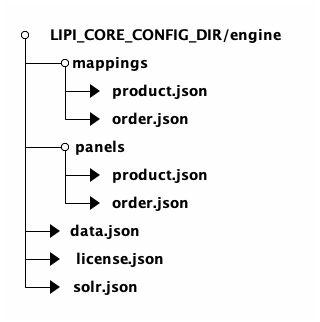
Defines field mappings and transformations between search index schema and source data.
Contains simulator-styled panel configurations for monitoring and api calling.
Contains data-related configurations including data source connections, fields mapping file and full/delta import.
Stores license information and related configurations required for LipiCore-Engine to operate.
Defines Solr security configurations such as authentication and authorization rules, and access control policies.
Contains Apache Solr server instance and credentials to connect.
| Refer Config Read to get runtime configuration from the running instance. |
20. Codes
Two types of codes are floating during entire API handshake.
-
HTTP Codes
-
Error Codes
HTTP Codes and Error Codes are defined accurately to pinpoint the exact problem with unique codes value.
| HTTP codes are standard 3 digits. Error codes are of 4 digits. |
20.1. Http Codes
API adheres to standard HTTP and REST conventions in its use of HTTP verbs and HTTP codes as closely as possible.
| Verb | Usage |
|---|---|
|
Used to retrieve a resource |
|
Used to create a new resource |
|
Used to update an existing resource with full updates |
|
Used to update an existing resource with partial updates |
|
Used to delete an existing resource |
| Status Code | Abbreviation | Error Codes | Usage |
|---|---|---|---|
|
|
Standard response for successful HTTP requests. |
|
|
|
1xxx |
The request is missing the auth or access in order to fulfill the request. |
|
|
2xxx |
The request is malformed, bad, invalid or having constraints. |
|
|
3xxx |
The requested resource does not exist. |
|
|
8xxx |
The request could not be completed due to a conflict with the current state of the target resource. |
|
|
9xxx |
A generic error given when an unexpected condition was encountered. |
20.2. Error Codes
API is based on complete token-based asynchronous mechanism which is extremely lightweight & fast.
| Code | Key | Description |
|---|---|---|
|
|
Access token is missing |
|
|
Access token is invalid |
|
|
Access token has been expired - {0} |
|
|
Access token not created - {0} |
|
|
License key invalid - {0} |
|
|
License auth invalid - {0} |
|
|
License is expired - {0} |
|
|
Auth invalid - {0} |
|
|
Unauthorized access |
|
|
Unauthorized collection access |
|
|
Required {0} parameter {1} is missing |
|
|
Invalid entity {0} |
|
|
Invalid parameters |
|
|
Invalid value {0} |
|
|
Invalid instance {0} |
|
|
Invalid account |
|
|
Invalid Mappings for collection |
|
|
Entity {0} with value {1} already exists |
|
|
Solr records range exceeded |
|
|
Solr collections range exceeded |
|
|
Constraint violation |
|
|
Unable to parse {0} exception {1} |
|
|
Entity {0} not found for {1} |
|
|
Generic exception |
|
|
Null pointer exception |
|
|
SQL exception |
|
|
Custom exception |
|
|
Solr client exception |
|
|
HttpClient exception |
|
|
LipiAccountClient exception |
|
|
Config exception |
21. Best Practices
21.1. Performance
-
Use pagination: Limit results with
startandrowsparameters -
Combine operations: Use the combine API for multiple searches
-
Cache responses: Implement client-side caching for frequently accessed data
-
Optimize queries: Use specific field searches instead of broad text searches when possible
-
Implement timeouts: Set appropriate timeout values for API calls
-
Handle errors gracefully: Always check response status and handle errors
-
Use async operations: For large data imports, use asynchronous processing
21.2. Security
-
Rotate tokens regularly: Implement token rotation for enhanced security
-
Use appropriate roles: Assign minimal required permissions to tokens
-
Secure storage: Store tokens securely and never expose them in client-side code
-
Monitor usage: Track API usage and watch for unusual patterns
-
Validate input: Always validate and sanitize input data
-
Use HTTPS: Ensure all API communications use HTTPS
-
Implement CORS: Configure CORS properly for web applications
21.3. Integration
-
Progressive enhancement: Start with basic search, add advanced features gradually
-
User feedback: Provide loading states and error messages
-
Fallback strategies: Implement fallbacks for when search is unavailable
-
Incremental updates: Use delta imports for large datasets
-
Batch operations: Group related operations for better performance
-
Error recovery: Implement retry logic for failed operations
21.4. Monitoring
-
Enable debug logging: Use
DEBUGlevel for troubleshooting -
Monitor performance: Track response times and error rates
-
Log requests: Keep request logs for debugging and analysis
-
Regular monitoring: Use health check endpoints to monitor service status
-
Alert systems: Set up alerts for service degradation
-
Performance metrics: Track key performance indicators
21.5. Code Examples
21.5.1. JavaScript/Node.js
const searchProducts = async (query, filters = {}) => {
  try {
    const response = await fetch('/api/v1/search/query/products', {
      method: 'POST',
      headers: {
        'Authorization': `Bearer ${Token}`,
        'Content-Type': 'application/json'
      },
      body: JSON.stringify({
        text: query,
        filters: filters,
        start: 0,
        rows: 20
      })
    });

    if (!response.ok) {
      throw new Error(`HTTP ${response.status}: ${response.statusText}`);
    }

    const data = await response.json();
    return data.data;
  } catch (error) {
    console.error('Search error:', error);
    throw error;
  }
};
21.5.2. Python
import requests
import json

def search_products(query, filters=None):
    url = "https://your-domain.com/api/v1/search/query/products"
    headers = {
        "Authorization": f"Bearer {Token}",
        "Content-Type": "application/json"
    }

    payload = {
        "text": query,
        "filters": filters or {},
        "start": 0,
        "rows": 20
    }

    try:
        response = requests.post(url, headers=headers, json=payload)
        response.raise_for_status()
        return response.json()["data"]
    except requests.exceptions.RequestException as e:
        print(f"Search error: {e}")
        raise
© 2026 LipiCore